To validate a product idea, get strangers to pay before you pay a supplier. Name who it is for, check search interest and complaints for free, and talk to ten likely buyers. Put a priced Shopify product page live and take paid pre-orders with a ship date. Decide how many paid orders justify a first run before you start.
Say a supplier quotes 100 ceramic pour-over sets at $22 each. Freight, duty and packaging add $8 to each set, so every one lands at $30 and the first run costs $3,000. Friends like the idea. None has paid. Get paid orders first, then let a number you set decide.
Who is the product for, and where do they already gather?
Name one group of buyers you could reach tomorrow, and the place they already gather. Write it as one sentence a stranger could read and think "that's me." "People who brew pour-over coffee at home" works. "Coffee lovers" does not.
The place is a forum, a group, a hashtag or a newsletter where ten of them are within reach. If you can't name it, you have nowhere to send a store page yet. Picking the idea itself is covered in 10 ecommerce business ideas.
How do you check demand without spending money?
Three free checks show whether anyone is looking: a search chart, the complaints in reviews and the questions buyers ask.
Start with Google Trends, a free tool that charts search interest in a phrase over time. Type your product's search phrase, then click "Add comparison" and enter the phrase for a product you know sells. Choose "Past 5 years" in the time menu and read the direction of each line, plus any yearly spike.
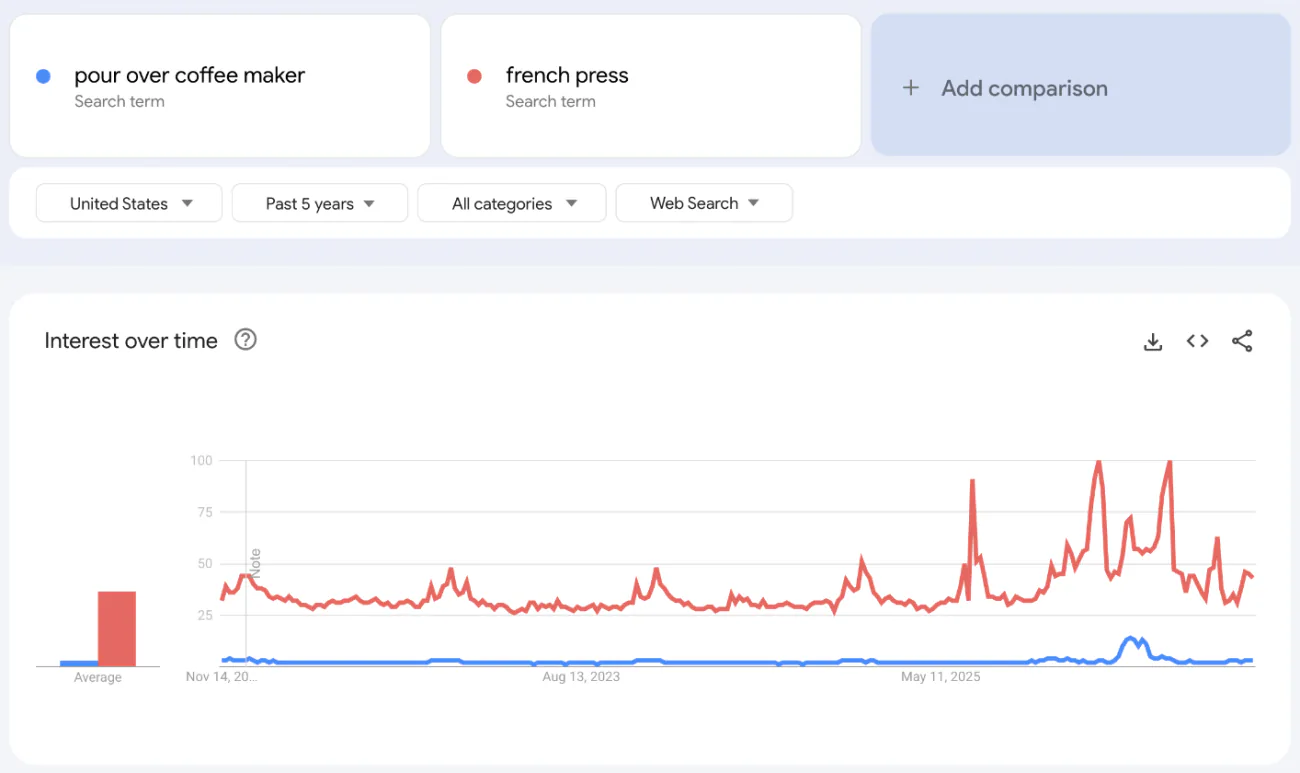
Google's Trends Help says the numbers are relative, on a scale of 0 to 100, and that low-volume terms appear as 0. So a 0 means too small to chart, not no demand. Its page on comparing terms adds that a chart won't cover misspellings, synonyms or plural and singular forms, so try two or three phrasings.
Next, read the one-star and two-star reviews of the nearest product that already sells. A complaint repeated across reviews is a likely angle.
Last, read the questions people ask in the group you picked. A question asked twice is worth answering on your page.
What do you ask ten likely buyers?
Ask what they do today and what they paid for it, not whether they would buy yours. Start with what they use now, when they last bought something like it and what it cost. Then ask what annoyed them and what they tried first.
Write down their words and don't pitch. A friend who isn't a buyer doesn't count, and two people naming the same complaint is a signal. End each talk by asking if you can send them the page later, since they become your first visitors.
What price and margin should the test use?
Test the price you would charge, and know what one sale leaves you after landed cost. Landed cost is the supplier's price plus freight, duty and packaging. For one set, $22 plus $8 is $30.
In your Shopify admin, open Products, click Add product and find the Price section. Click the "Cost per item" chip under the price, the place for what one unit costs you, and type 30 in the Cost box that opens below. With $60 in Price, Shopify prints a Profit of $30 and a Margin of 50%.
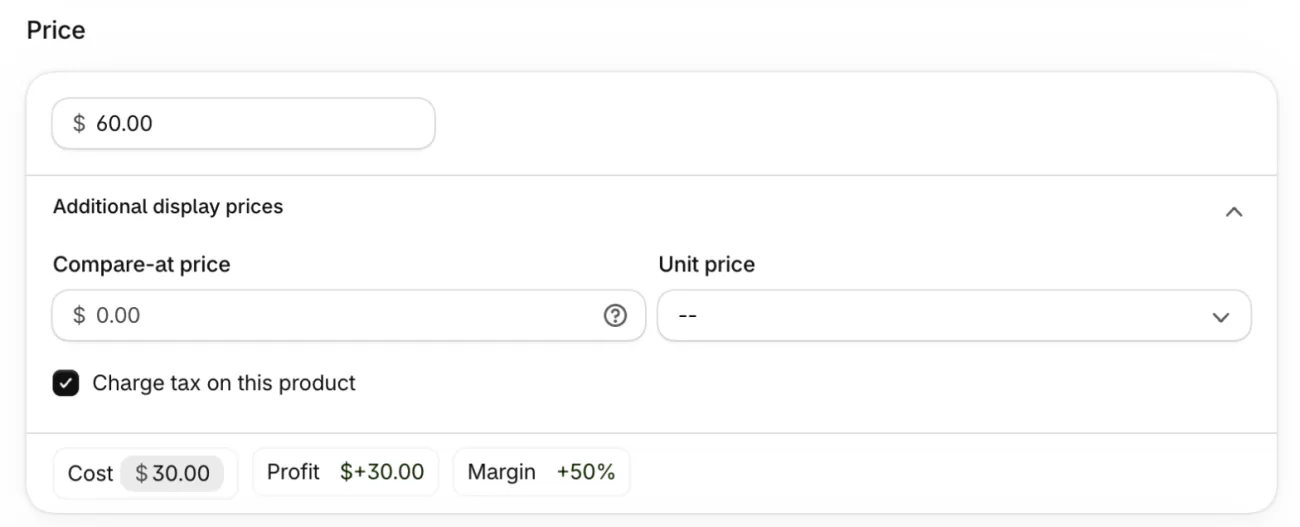
The margin is the price minus the cost, divided by the price. Shopify's help page works it for a $50 price and a $30 cost, which gives 40%. Its example for a reseller uses the manufacturer's price without shipping or other costs. Entering the landed cost instead is your own choice, and it shows what a sale leaves you.
If your prices include tax, Shopify hides the readout while "Charge tax on this product" is ticked, so do the sum by hand. Ads, returns and card fees come off that margin, so a thin margin at the test price is already a result.
How many paid orders should you wait for?
Decide the number of paid orders before the page goes live, from what a first run costs. Multiply the minimum order by your landed cost: 100 sets at $30 is $3,000. Pick the share the paid orders must cover before you order. Say half, which is $1,500. Divide that by your price: at $60, that is 25 paid orders, one set each.
Write 25 and an end date down before you share the page. The half is how much risk you carry, not a standard. Shopify's guide to validating product ideas, updated in June 2025, also says to set pass or fail targets before you test. Pass rates printed in guides disagree with each other, so use your own arithmetic, not someone else's percentage.
Count payments, not visits, sign-ups or carts, and leave out orders from friends and family. If 25 is out of reach, ask the supplier for a smaller minimum. A smaller run usually costs more per unit, so redo the margin check, but it cuts the cash at risk. How to find a supplier covers minimum orders. A product made after the order, such as print on demand, has no first run to fund.
What goes on the page you send them to?
Send one clear page to your ten and to the group, with a price, a picture and a ship date. Use a Shopify product page or a landing page. Show a clear photo of the sample, or a mockup marked as a mockup. Put the price from the margin check under the title.
Add two lines on what the product fixes, in the words your ten used. Then give the ship date, a line that reads "If we cancel, you get a full refund" and one buy button. Post the page where the group gathers and send it to the ten.
If your payment provider rules out pre-orders, run the test as a waitlist and ask for the order once the ship date is firm. Landing page examples has a waitlist page to copy, and notify me or pre-order compares the two. A waitlist is weaker proof than a paid order, because an email costs a visitor nothing.
Can you take payment before the stock exists?
Yes, against a ship date you can keep, where your payment provider allows it. Shopify's Help Center says its pre-orders need a pre-order app and are currently open only to stores that take payments through Shopify Payments or PayPal Express, and its setup page adds that shoppers cannot pay for them with Shop Pay, Apple Pay or Google Pay. Without an app, tick "Continue selling when out of stock", the Inventory card setting that keeps a product buyable at a quantity of 0 once inventory tracking is on, and write the ship date in the description. Sledge pre-order, in every Sledge plan, keeps the products you pick with "Add products" taking orders at zero stock, where your payment provider allows. Sledge pre-order also adds a "Pre-order" button and a note, such as your ship date, that shoppers see in the cart, at checkout and in the order email.
What do you do when the test ends?
When the date arrives, either the number is met and you order small, or you refund and stop.
If the number is met, place the small first order. Then record it in Shopify: open Products, click "Purchase orders", then "Create purchase order", and mark it "Ordered" once the supplier confirms. A purchase order is your written order to the supplier, and the purchase order template gives you one to copy. Shopify first asks you to set up the supplier and a receiving location and to turn on inventory tracking for the product. Keep the ship date you gave.
If the number is missed, cancel each unfulfilled paid order and refund the full amount to the original payment. Shopify's help page on canceling orders lists that as the default of three refund options. For pre-orders, Shopify's page on managing pre-orders says you might need to cancel the order in your pre-order app as well, once you have refunded it from Orders.
Then close the pre-order. If you ticked "Continue selling when out of stock" yourself, untick it. If you used Sledge pre-order, turn the campaign off or delete it. That restores the stock setting Sledge changed, only on the products it switched, and leaves alone any product another Sledge pre-order still uses.
Or change one thing, the price, the photo or the group, and run the test once more with a new number written first. Don't buy stock to rescue a test that missed.
FAQ
Questions, answered
-

14-day free trial
Explore Sledge on your store before you decide to commit.
-

No credit card required
Start improving your store with no upfront commitment.
-

Setup in minutes
Get Sledge running without a lengthy setup process.
-

Built to grow sales
Turn shopper behavior into actions that help you sell more.
How do you validate a product idea for profitability?
Work out what one sale leaves you before you test. Add the supplier's price, freight, duty and packaging to get your landed cost, then enter it as Cost per item in Shopify's Price section. Shopify prints the profit and the margin, which is price minus cost, divided by price. Ads, returns and card fees come off that.
How many paid orders mean a product idea is validated?
There is no standard number, so pick yours before you start. Multiply the supplier's minimum order by your landed cost, decide what share of that the pre-sales must cover, and divide by your price. Shopify's own guide advises setting pass or fail targets before you test. Count paid orders from people outside your circle.
How long should a product test run?
You choose the length, so set the end date before you share the page, and write it beside your order number. Match it to a ship date you can keep, because everyone who paid is waiting on it. When the date arrives, compare paid orders with your number, then place the small batch or refund everyone.
Does a waitlist prove a product idea will sell?
Not on its own. It shows interest, and an email costs the visitor nothing. A paid order costs them money, so it is stronger proof. Use a waitlist when your payment provider rules out pre-orders, then ask for the order once your ship date is confirmed. Landing page examples has a waitlist page to copy.
What do you owe people who pay before a product ships?
Shopify's Help Center says you need a reasonable basis for the ship date you give. With no date, you must reasonably expect to ship within 30 days. If you run late, give a revised date and explain the buyer's right to cancel or get a refund. This is general information, not legal advice.
Can you validate a product idea without spending money?
The first three steps cost nothing: name your buyer, check Google Trends and read the one-star and two-star reviews of products like yours, then talk to ten likely buyers. A live page and a pre-sale need a Shopify plan and a ship date. Do not buy stock until orders are paid.
Take the first orders before the stock is bought
Sledge doesn't research demand, interview buyers or order stock. Its pre-order keeps the products you pick taking orders at zero stock, where your payment provider allows. Try it free for 14 days. Growth Intelligence turns on when you pick a paid plan, and its suggested fixes add up to one dollar figure, labeled Est. potential.