A product description template is a fixed order for a product's text: one opening line, a short paragraph, a few benefit bullets and the details a shopper checks. Copy the layout below, fill in the brackets, then paste it into the Description box under Products in your Shopify admin and click Save.
You have 40 products to list and one evening. The supplier's description is two lines, word for word the same on a dozen other stores. You click into the Description box and the cursor blinks.
Free product description template to copy
Replace each highlighted bracket and delete any line that doesn't fit. Words outside brackets, such as Size and Care, stay.
[Opening line: the product type and who it's for, then the one thing it does well.]
[Short paragraph: the moment or problem in one sentence, then how this product handles it in one or two.]
- [Feature, then what it means for the buyer.]
- [Feature, then what it means for the buyer.]
- [Feature, then what it means for the buyer.]
Size: [measurements, with units]
Material: [what it's made of]
Weight: [weight, with units]
Comes with: [what's in the box]
Care: [how to look after it]
[Good to know: who it suits, what it works with, or what to check before ordering.]
Written for this page, November 2026. Shopify's Help Center read November 23, 2026.
The template has no call to action line, because your theme's Add to cart button is the call. For how the words should sound, see brand voice examples.
How do you write each part of a product description?
Together the parts answer four questions a shopper asks before paying: what is it, why would I want it, how big is it, and will it work for me.
| Part | Write | Skip |
|---|---|---|
| Opening line | What it is and who it's for, with the product type first | "Amazing" and "high quality". Shopify's Help Center says a line like "excellent product quality" tells shoppers nothing substantial |
| Short paragraph | One moment or problem, then how this product handles it | Claims you can't back up. Shopify says every claim should be factual |
| Bullets | One feature each, then what it does for the buyer | A fourth bullet that repeats the first |
| Detail lines | Numbers with units, the material, what's in the box | Guesses. Leave a line out when you don't know |
| Good to know | Fit, what it works with, who it isn't for | Delivery and returns, which sit better near the button |
The detail lines answer what photos can't. Baymard's 2021 study says descriptions should cover materials, labeled dimensions and compatibility. Half of its desktop testers shopping for beauty products needed the ingredients, and were quick to dismiss a product without them.
What do product description examples look like?
Four made-up products, four layouts: lead with the benefit, the specs, the fit or the taste. Each sample follows the template above, and a highlighted [bracket] marks a fact only you know.
1. Benefit first: a stoneware mug
A wide stoneware mug for slow mornings.
It holds [350 ml], enough for a large pour-over, and the wide base sits steady beside a keyboard. Each mug is glazed by hand, so [the speckles differ from mug to mug].
- Wide base: stays put when you reach for it.
- Thick handle: [two fingers] fit through it.
- [Dishwasher safe]: no scrubbing after the first cup.
Size: [9 cm tall, 9 cm wide / 3.5 in by 3.5 in]
Material: stoneware with a [speckled oat] glaze
Weight: [380 g / 13.4 oz]
Care: [dishwasher and microwave safe]
Use it when shoppers buy the product for how it feels in use.
2. Specs first: a desk lamp
A small LED desk lamp with an arm that folds flat.
Point the light at the page, then fold the arm down when you finish. The [12 cm] base fits beside a laptop, and one cable powers it.
- Three brightness levels: [soft for late evenings, bright for reading].
- Folding arm: reaches [40 cm] and lies flat in a drawer.
- USB power: runs from [a laptop port or a phone charger].
Size: [45 cm tall / 17.7 in]
Material: [metal arm, plastic shade]
Weight: [620 g / 1.4 lb]
Comes with: lamp, [1.5 m] cable
Care: wipe with a dry cloth
Good to know: [the plug adapter is not included].
Use it when shoppers compare numbers before they buy.
3. Fit and care first: a linen shirt
A relaxed linen shirt, made to wear untucked.
The linen is [washed before it's cut], so it feels soft from the first wear. The cut is [roomy through the chest], so a tee fits under it.
- Roll-up sleeves: they stay rolled.
- Straight hem: sits flat when it's untucked.
- [Shell buttons]: sewn on with a [reinforced] stitch.
Size: [S to XL, chest 104 to 124 cm / 41 to 49 in]
Material: [100% linen]
Care: [machine wash cold, hang to dry]
Good to know: [it runs true to size; the model is 180 cm tall and wears a medium].
Use it when the first question is "will it fit?"
4. Taste first: coffee beans
A medium roast with notes of [cocoa and orange peel].
A balanced cup for [filter machines and pour-over]. The beans come from [one farm in a named region] and are roasted in small batches.
- Tasting notes: [cocoa, orange peel, brown sugar], so you know what to expect.
- Whole bean: grind it at home to the size your brewer needs.
- Roast date: printed on every bag, so you can see how fresh it is.
Roast: [medium]
Origin: [country, region]
Weight: [250 g / 8.8 oz]
Comes with: [one resealable bag]
Care: store sealed, away from light and heat
Use it when shoppers pick by taste. Keep health claims out unless you can prove them.
Where do you paste a product description in Shopify?
Open Products, click a product or Add product, and paste into the Description box under the Title.
- Copy your finished text from a plain notes app. Shopify warns that text copied from another site can bring unwanted formatting that may cause display errors.
- In your Shopify admin, click Products, then Add product or an existing product, click into Description and paste.
- Select the opening line and click Bold. Put each bullet on its own line, select those lines and click Bulleted list.
- Click Save. Shopify says saved edits to a product already on your store take effect right away.
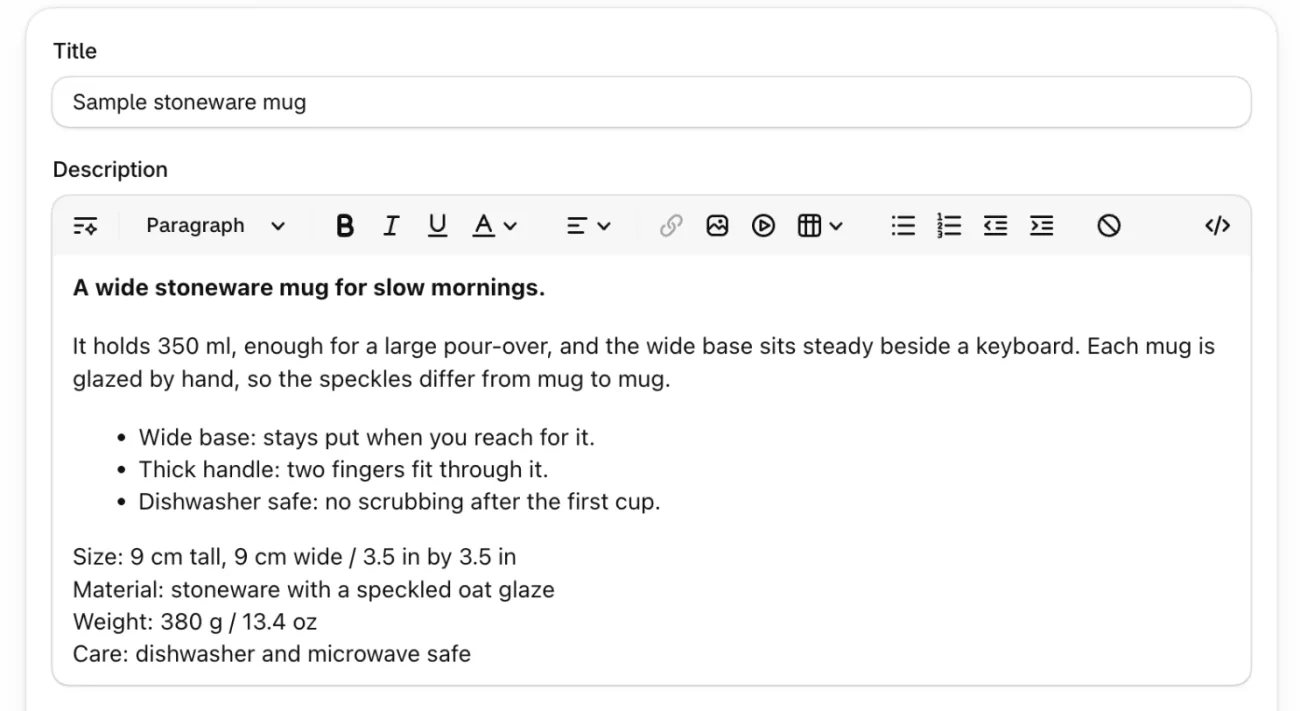
Want a first draft to edit? Click the Generate text icon, Shopify's built-in writer, at the start of the Description toolbar, describe the product and click Generate. The text waits in a preview until you click Add. Shopify warns it can add benefits you never listed, so read every line. It needs a computer, not the phone app, and Shopify Sidekick covers what else it does.
Shopify's Help Center says a product with no meta description uses its product description, so the opening line can do double work. The meta description guide shows where to write one. New to the rest of the form? How to add products to Shopify walks through the title, photos, price, stock and sizes.
How do you keep the same layout on every product?
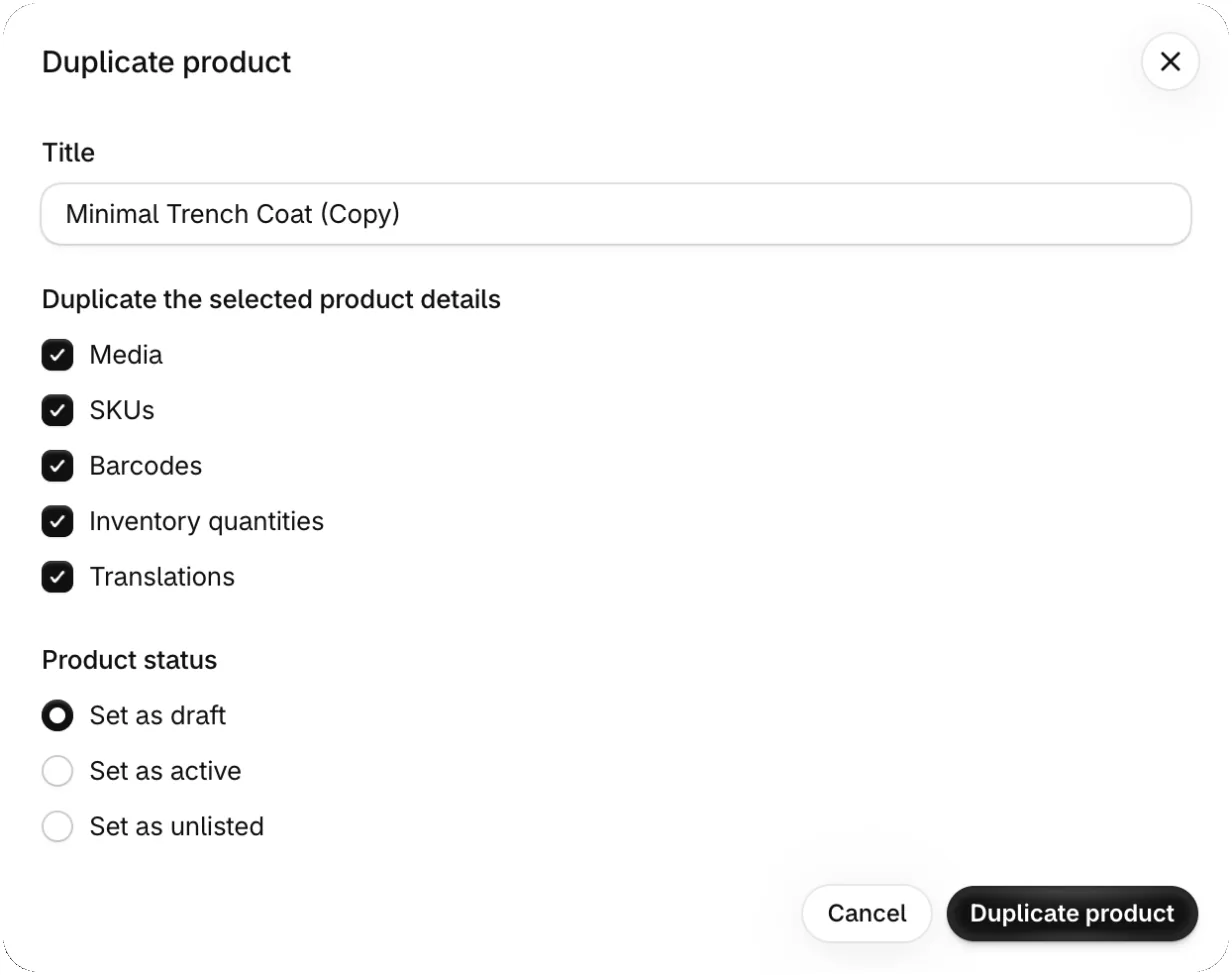
Finish one product, then copy it. Open it, click More actions, then Duplicate product, and in the window that opens give the copy its own Title. Under Product status, leave Set as draft selected, so the copy stays off your store until you've replaced its facts. The same idea works for the whole range: one set of columns for every product, as in the product catalog template.
Under "Duplicate the selected product details" the window lists five ticked checkboxes you can clear: Media, SKUs, Barcodes, Inventory quantities and Translations. Description is not one of them, and Shopify's Help Center says every other detail except 3D models and videos is copied, so the text always comes along. Check every number afterward: a copied mug description still carries the mug's weight.
What should a product description leave out?
- Price, sale dates and shipping. If you list products on Google, its Merchant Center help asks for a description with no price, sale, shipping or delivery-date text, no links to your store and no all-capital emphasis. Delivery and returns belong near the button, as the product detail page guide shows.
- The supplier's wording. Shopify's Help Center says a reseller shouldn't copy the manufacturer's exact description, because your own keeps the page unique to search engines. The SEO checklist covers the rewrite as one of its eight jobs.
- Claims you can't prove. Name what the product is and does, and leave the "best" and "most" lines for a review a customer wrote.
Does Sledge read your product description?
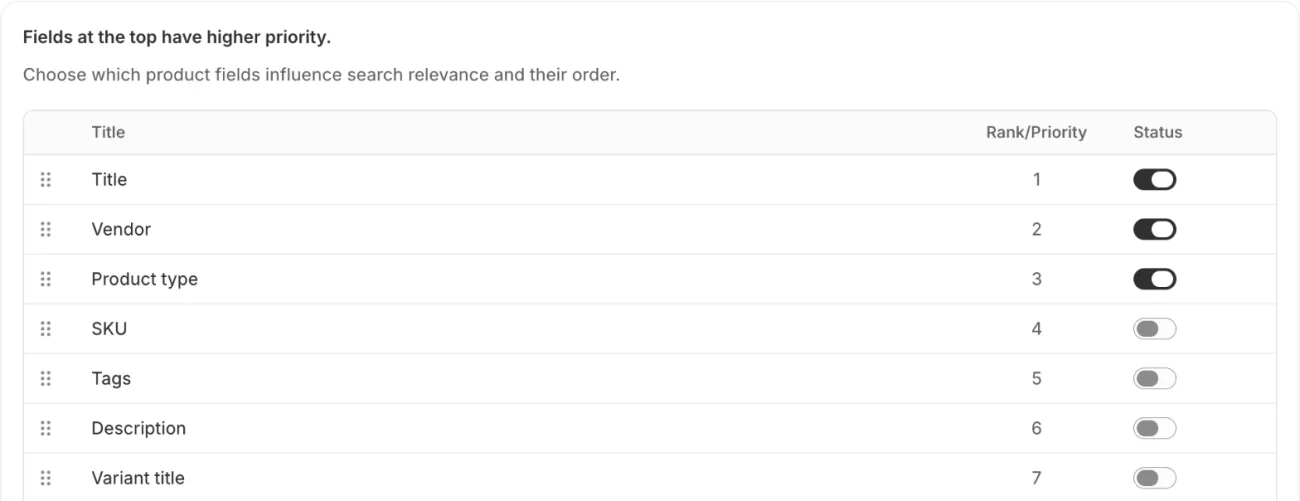
Sledge's search can read a product's Description if you switch it on in Field Priority, and its filters can be built from details such as Vendor, Product Type and Tags. Sledge doesn't write descriptions.
In Sledge, open Tools, then Search, then Field Priority, the list of product details search can read. The page's heading reads "Fields at the top have higher priority." Each detail has a rank and its own switch under Status. The details are Title, Vendor, Product type, SKU, Tags, Description and Variant title (the size or color name, such as Small or Blue). Your store's own product options, such as Color, can follow as extra rows.
Filters read separate details. In "Add filter item", the Source list, read November 20, 2026, offers choices such as Vendor, Product Type and Tags, but none for the product's Description, so a material that sits only inside a paragraph won't become a filter. Add it as a Tag too. Write the description for shoppers, and put the words they type in Title, Type, Vendor and Tags as well.
FAQ
Questions, answered
-

14-day free trial
Explore Sledge on your store before you decide to commit.
-

No credit card required
Start improving your store with no upfront commitment.
-

Setup in minutes
Get Sledge running without a lengthy setup process.
-

Built to grow sales
Turn shopper behavior into actions that help you sell more.
What should a product description include?
An opening line that says what the product is and who it's for, a short paragraph on why it's worth buying, three to five benefit bullets, and the details a shopper checks: size, material, weight, what's in the box and care. Leave out any claim you can't prove and, if you list products on Google, price and shipping text.
Where do I put a product description in Shopify?
In your Shopify admin, click Products, then Add product or an existing product, and write in the Description box under the Title. Format it with the toolbar, then click Save. Shopify says saved edits to a product already on your store take effect right away.
How long should a product description be?
Long enough to answer what a buyer asks before paying. Google says the length of content alone doesn't matter for ranking, and there's no magic word count. Cut a line when a shopper wouldn't miss it. Ecommerce SEO covers the rest of the page.
Can Shopify write a product description for me?
Yes. In the Description toolbar, the Generate text icon opens a box where you describe the product, and Shopify's Sidekick drafts the text. The draft waits in a preview with Discard and Add buttons. It needs a computer, not the phone app. Shopify warns it can add benefits you never listed, so check every line.
Can Sledge write or use my product descriptions?
Sledge doesn't write or edit them. Its search can read a product's Description if you switch it on in Field Priority, and its filters are built from separate details such as Vendor, Product Type and Tags. Write the description for shoppers, and put the words they type in those boxes too.
The copy is written. Can shoppers find the product?
Sledge doesn't write or edit product descriptions. It starts once the copy is in Shopify: its search can read Description when you switch it on in Field Priority, and its filters can be built from details such as Vendor, Product Type and Tags. Try it free for 14 days. Growth Intelligence turns on when you pick a paid plan. It reads your searches, carts and orders, and lists fixes with one dollar total, labeled Est. potential.