A product catalog is one organized list of everything you sell, with the same details filled in for every product: name, photo, price, sizes or colors, category and stock. It can live in a spreadsheet, in your Shopify Products list, or in a PDF you send to a buyer. Copy the template below, then fill it from your store.
Say a café asks to see everything you sell. You have 40 candles in four scents, and the Products list calls one "Cedar candle", another "candle, cedar" and a third "Cedar (large)". The list is all there. It just isn't a catalog yet.
What is a product catalog?
A product catalog is the list behind your store, not a page of it. It is the list itself: one row for each product or size, with the same details filled in. Shopify's own guide describes a product catalog as a listing of a business's products, printed, on a website, in an app or as a PDF. Shopify also uses the word for two other things, and the last section sorts them out.
| Where it lives | What it is for | When it goes wrong |
|---|---|---|
| A sheet you keep | Your master list in Excel, Numbers or Google Sheets. | A price changes in Shopify and not in the sheet. |
| Your Shopify Products list | The live version, which shoppers reach through collections. | One product is spelled five different ways. |
| A PDF or printout | The copy a buyer or customer can keep. | The day after you send it. |
A product listing page is one page of your store that shows a group of products. In an ecommerce store, the catalog is the list behind all of those pages. Starting from nothing? Add the products first with how to add products to Shopify.
What goes in a product catalog?
Twelve columns are enough to start a catalog: a name, a short description, a category, a type, a brand, a collection, sizes or colors, a price, a stock code, a stock count, a photo and tags.
Select the table, copy it into a blank Excel, Numbers or Google Sheets file, then replace the three made-up example rows. There is no file to download. The product description template covers what to write in Short description.
| Product name | Short description | Category | Type | Brand | Collection | Sizes or colors | Price | Stock code | In stock | Photo | Tags |
|---|---|---|---|---|---|---|---|---|---|---|---|
| Stoneware mug | Speckled glaze, 12 oz, dishwasher safe | Mugs in Drinkware | Mug | Maker A | Kitchen | Color: Sand | 18.00 | MUG-SAND | 24 | mug-sand.jpg | gift, kitchen |
| Stoneware mug | Speckled glaze, 12 oz, dishwasher safe | Mugs in Drinkware | Mug | Maker A | Kitchen | Color: Slate | 18.00 | MUG-SLATE | 12 | mug-slate.jpg | gift, kitchen |
| Cedar candle | Hand-poured soy wax, cedar and smoke, 8 oz | Pick from Shopify's list | Candle | Maker B | Home | Size: 8 oz | 22.00 | CND-8 | 40 | cndl-cedar-8.jpg | gift, home |
Written for this page, November 2026. Shopify Help Center checked November 24, 2026.
Four rules keep the sheet clean:
- Use one row for each size or color you sell, with the product name repeated on each row. The stock code, price and count belong to the size, so keep a product's rows together.
- Spell each brand, type and size one way. Two spellings of one brand read as two brands.
- Write a price as a plain number, such as 18.00. Shopify's own product file wants no currency symbol.
- Format the stock code column as text before you paste codes in. Excel drops leading zeros and turns long codes into scientific notation, and Microsoft names product codes among its examples.
Each column matches a box on Shopify's product form, and the picture shows where five of them sit.
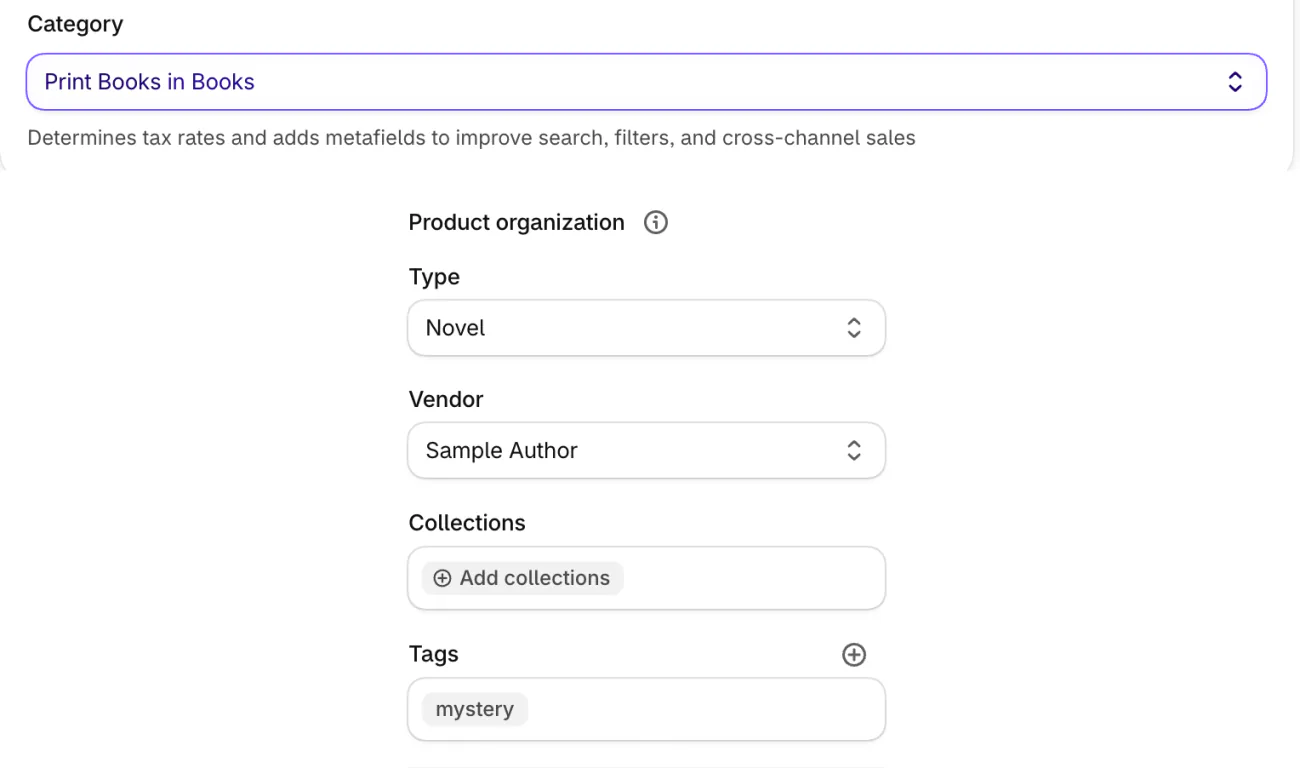
The last column shows what Sledge reads. "Search" means Sledge's search, whose Field Priority page has one switch for each field.
| Column | Where you fill it in Shopify | What Sledge reads |
|---|---|---|
| Product name | Title | Search, on at the start. |
| Short description | Description | Search, off until you switch it on. |
| Category | Category | Filter source "Category". |
| Type | Product organization, Type | Filter source "Product Type". Search, on at the start. |
| Brand | Product organization, Vendor | Filter source "Vendor". Search, on at the start. |
| Collection | Product organization, Collections | Filter source "Collection". |
| Sizes or colors | Variants, "Add options like size or color" | Filter sources "Options Size" and "Options Color", named after your option. Search, off until you switch it on. |
| Price | Price | Filter source "Price". |
| Stock code | Inventory, SKU | Search, off until you switch it on. A store that saved this list earlier keeps its old choices, so check the switch. |
| In stock | Inventory, Quantity | Filter source "Availability". |
| Photo | Media | Not read by filters or search. |
| Tags | Product organization, Tags | Filter source "Tags". Search, off until you switch it on. |
Need your cost per item? Keep it in the original export, and take it out of the copy before anything goes to a buyer.
How do you build the sheet from your Shopify store?
Export your products from Shopify, delete what a buyer shouldn't see, and rename the headings in plain words.
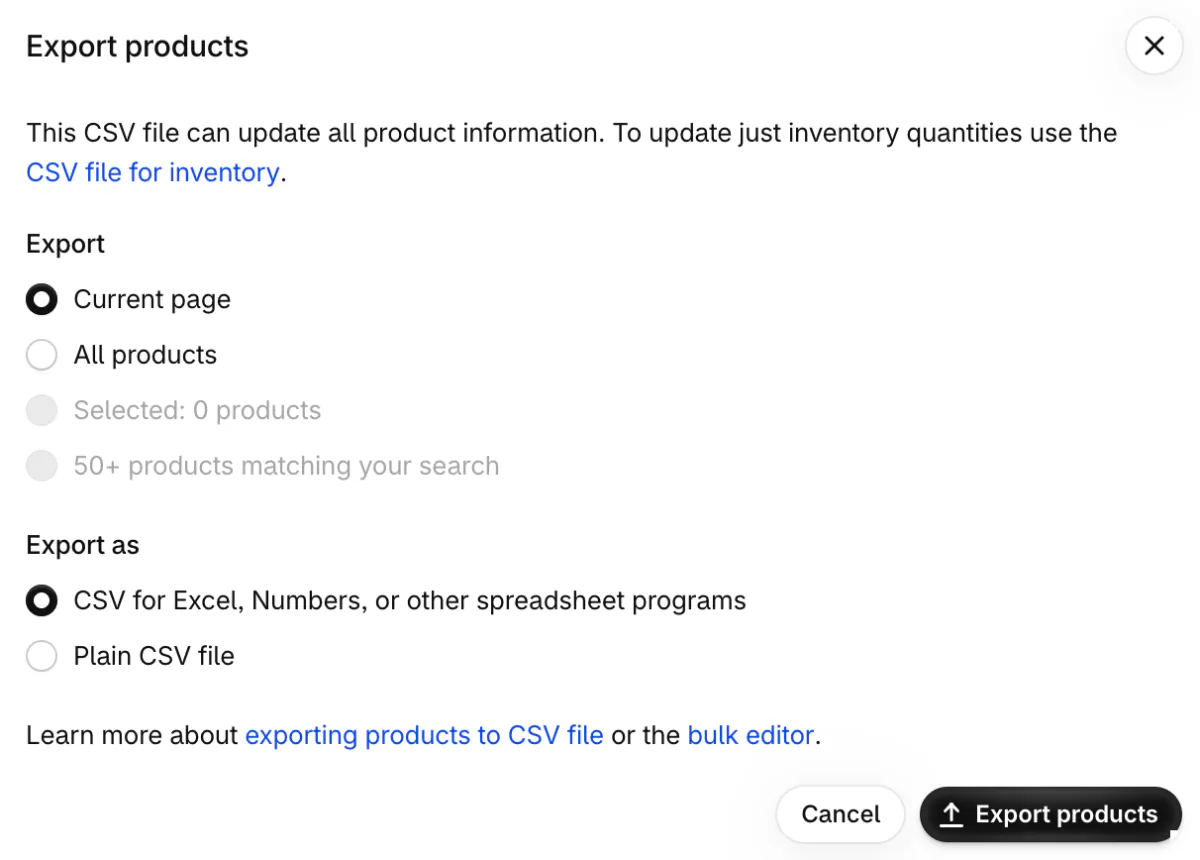
- Go to Products and click Export.
- Pick "All products", or filter the list first and pick the products that match your search. Keep "Export as" on "CSV for Excel, Numbers, or other spreadsheet programs", a spreadsheet saved as plain text, then click "Export products". Shopify emails you the file when you pick All products.
- Open the file and save a copy. Work only on the copy.
- Delete the columns a buyer shouldn't see. Shopify's Help Center lists a "Cost per item" column in the product file, so it goes first. Keep the ones that match the template, such as Title, Description, Type, Vendor, Price and Tags, and rename their headings in plain words.
- Add what the file leaves out. It carries no collections, so add a Collection column by hand. Pictures come as links, not files, so the Photo column holds a link or a file name.
- Make each entry match: one spelling for each brand, type and size, and a Category on every product. Shopify saves a product with none as "uncategorized". Then check the stock codes: if one lost a leading zero, type it back and set that column to text.
Treat the sheet as a copy. Shopify warns that sorting the file can detach variants and picture links, and that importing a sorted file might overwrite products with bad data you can't get back. Change products in Shopify, with the Shopify bulk editor, then export again. Shopify imports a spreadsheet file, not a PDF, and how to import products to Shopify has the steps.
In Shopify, the Products list is already a catalog system. Shopify's catalog management guide says its built-in tools are often enough while a few teams keep consistent product data. Once several suppliers, markets and approval steps make that hard, it points to a product information management system, software where larger teams collect, clean up and approve product data. For stock counts, see Shopify inventory management. For a sheet that tracks counts, cost and days left, copy the inventory spreadsheet template.
Which layout should a catalog use?
Pick the layout from the way a buyer compares: by photo, by price or by spec.
| Layout | Fits | Each product gets | Columns it needs |
|---|---|---|---|
| Photo grid | Candles, mugs and clothing | A big photo, the name and the price | Photo, Product name, Price, Short description |
| Price list | Refills, food and supplies sold in set sizes | One row for each size | Product name, Sizes or colors, Stock code, Price |
| Spec sheet | Tools, parts and electronics | One row of facts to compare | Product name, Stock code, and a column for each fact shoppers compare, such as size or material |
| Line sheet | Shops that stock your range | A wholesale price beside the suggested retail price, and a minimum order | The same columns, plus wholesale price and minimum order |
To make a layout a PDF, lay the cleaned sheet out in a design tool, or print it from the spreadsheet as a price list.
What do Shopify and Sledge do with the details you fill in?
The same columns sort your store: a collection can fill itself from them, and Sledge's filters and search can read most of them.
When you create a collection, click "Add condition" and pick what a product must match: its Type, Vendor, Tag, Price, Inventory stock or Category. Give every candle the same Type, add the condition Type is equal to Candle, and the Candles collection fills itself. A shop with 80 collections doesn't need 80 tags. It needs a Type and a few tags used the same way on every product.
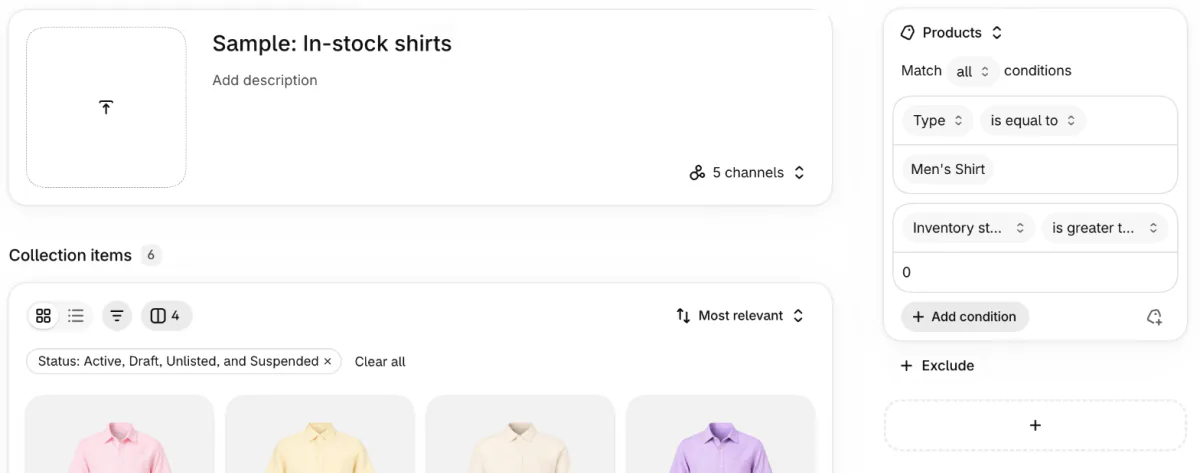
A collection can also hold other collections, and Shopify's guide suggests collections as the table of contents of a catalog. Shopify's product category is also used for tax rates in Shopify Tax and by your other sales channels. Shopify collections covers the rules.
Sledge's filters and search read most of these same fields. In Sledge, open Tools, then Product Filter, open a filter group and click "Add filter item". The Source box lists what a filter can be built from: Availability, Category, Collection, Product Type, Tags, Price, Vendor, your options such as Size and Color, and your custom product details.
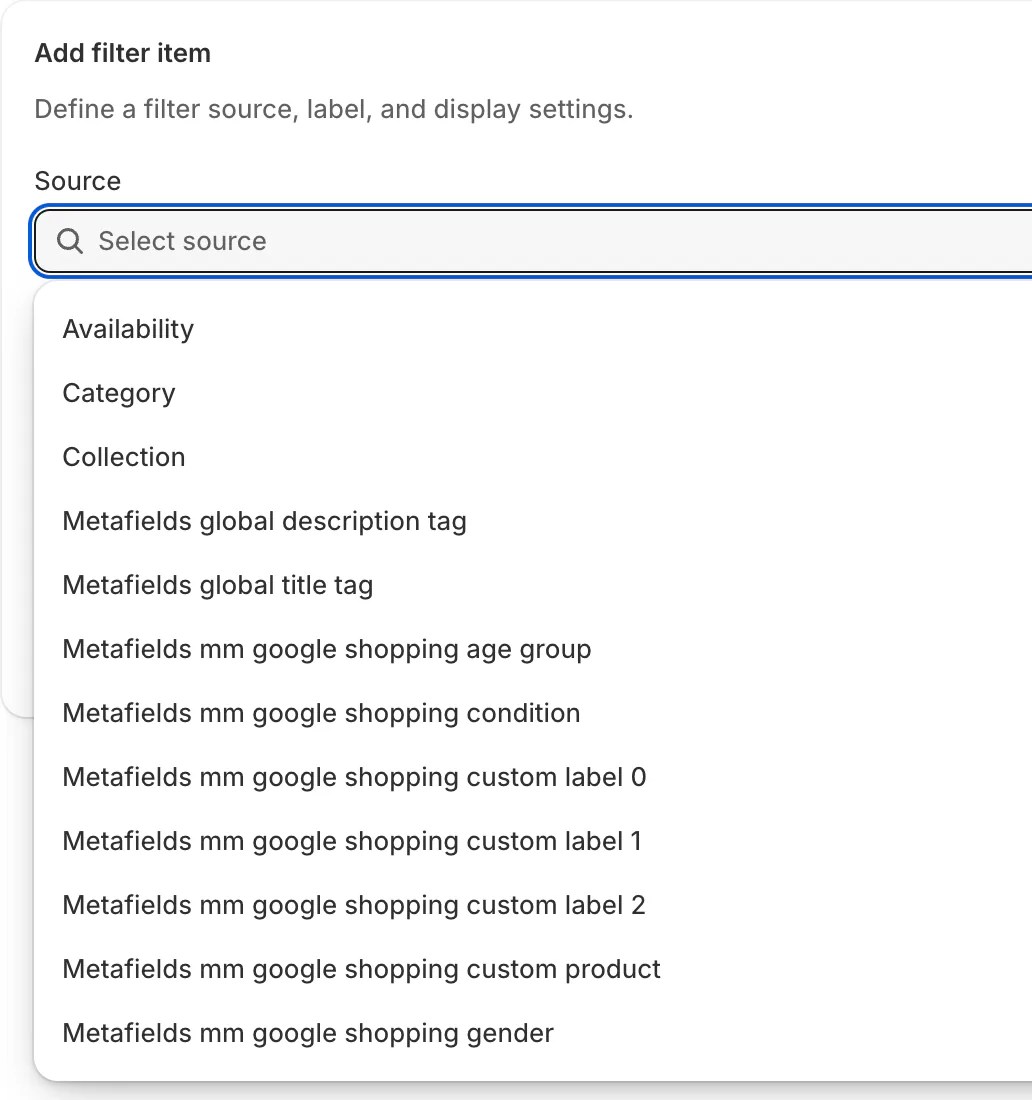
Search works from Field Priority under Tools, then Search, where Title, Vendor and Product type start on, and Tags, Description and SKU are switches you turn on yourself. A blank cell gives a filter nothing to list. The longer field-by-field table is in how to add products to Shopify.
Sledge doesn't build or edit a catalog. It reads your products automatically and keeps up when you change them. Pro covers up to 10,000 products, Scale up to 200,000, and Accelerate and Ultimate have no limit.
Is a Shopify catalog the same thing?
No. Shopify uses the word for wholesale price lists and for the product data its sales channels read, and neither is the catalog on this page.
- B2B catalogs. Under Markets, then Catalogs, click "Create catalog" to choose which products and prices your wholesale buyers see. Shopify's Help Center says Basic, Grow and Advanced allow up to 3 active catalog assignments across B2B markets, and Plus has no limit. A PDF is a document. A B2B catalog is how a wholesale buyer orders in your store at their price, and Shopify B2B covers the setup.
- Shopify Catalog. This is Shopify's own name for the structured product data that Shop and select AI platforms can read. Shopify says it includes eligible products automatically and promises no placement. The AI shopping assistant guide has the switches.
FAQ
Questions, answered
-

14-day free trial
Explore Sledge on your store before you decide to commit.
-

No credit card required
Start improving your store with no upfront commitment.
-

Setup in minutes
Get Sledge running without a lengthy setup process.
-

Built to grow sales
Turn shopper behavior into actions that help you sell more.
What is a product catalog?
A product catalog is one organized list of everything you sell, with the same details filled in for every product: name, description, photo, price, sizes or colors, category and stock. It can live in a spreadsheet, in your Shopify Products list or in a PDF you send to a buyer. A Shopify B2B catalog and Shopify Catalog are different things.
What should a product catalog include?
Include a product name, a short description, a category, a type, a brand, a collection, sizes or colors, a price, a stock code, a stock count, a photo and tags. Together they make the 12-column template. Leave your cost per item and supplier notes out of any file you send to a buyer.
How do I make a product catalog from my Shopify products?
Go to Products, click Export, choose All products and the CSV for Excel, Numbers, or other spreadsheet programs, then click Export products. Shopify emails you the file for All products. Open it in a spreadsheet, delete the columns a buyer shouldn't see, rename the headings in plain words and add a Collection column by hand.
Can I turn my Shopify products into a PDF catalog?
Shopify's Export gives you a spreadsheet file, not a designed PDF. Lay the cleaned sheet out in a design tool, or print it from the spreadsheet as a price list. The Shopify App Store also lists apps that build PDF catalogs and line sheets from your products, so read each listing for its price and what it exports.
What is the difference between a product catalog and a product listing page?
A product listing page is one page of your store that shows a group of products, such as a collection or your search results. A product catalog is the list of every product and its details behind all of those pages, kept in a sheet or a PDF. Shoppers browse the page, and you keep the catalog.
Does Sledge build or read a product catalog?
Sledge doesn't build, edit or send a catalog. It reads the products already in Shopify: its filters can list Category, Collection, Vendor, Product Type, Tags, Price and Availability, and its search reads Title, Vendor and Product type from the start. Filters and search come with every paid plan and a 14-day free trial.
Your catalog columns can become your filters.
Sledge doesn't build, edit or send a product catalog, a PDF or a line sheet. It reads the products already in your Shopify store. Its filters can use the Category, Vendor, Type, Tags and options you filled in, and its search reads the Title, Vendor and Type. Try it free for 14 days. Growth Intelligence turns on when you pick a paid plan, and its suggested fixes add up to one dollar figure, labeled Est. potential.