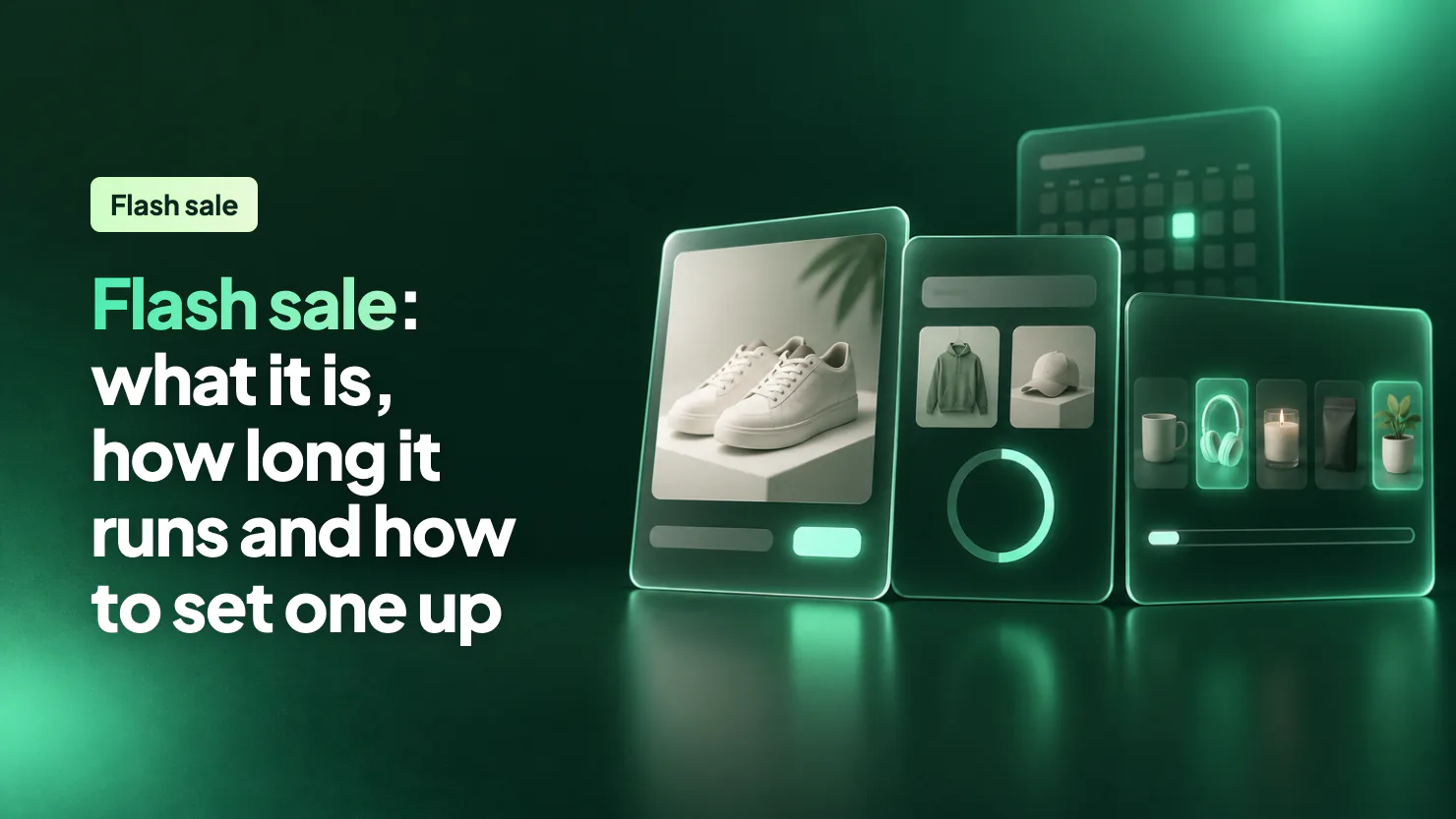
A flash sale is a discount that runs for a short, fixed time, usually a few hours to about two days, so shoppers buy now. In a Shopify store it has three limits: when it ends, how many orders can use it, and how many units you hold. Shopify keeps each in a different place.
Say you email 30% off a grey knit, today only, for the first 50 orders. Order 51 still gets 30% off, and so does every order after it until the end time. You gave the discount an end date, but nothing capped it at 50. Your stock count is a third limit.
What does flash sale mean, and how long should one run?
A flash sale is a discount with a short, real end, from a few hours to about two days. Shopify's guide for large brands says most last between two and 36 hours and that the shorter the sale, the better. Salesforce's guide calls 24 hours a common choice, 2 to 4 hours best for a VIP or online-only sale, and says interest tends to drop after two days.
The short end and the limited stock are what make shoppers buy now, so both have to be real. The glossary entry on scarcity marketing says where urgency turns fake. Frequent flash sales wear the effect down too, since Shopify's guide warns of flash sale fatigue and shrinking returns.
Good reasons to run one are clearing stock, launching to your email list and a restock drop. What to put on sale covers which products to pick, and the holiday marketing calendar lists the 2027 dates and the week to start work on each.
Durations from the two guides above, read November 24, 2026. Shopify's page is dated January 11, 2024. Salesforce's shows no date, but its page data gives April 2025, updated August 2026.
Does your store need special preparation for a flash sale?
Usually not. Shopify's Help Center recommends special preparation only when you expect tens of thousands of customers to start a checkout within a few minutes. Its own example is a store with 10,000 visitors and 100 orders a day that expects 50,000 visitors and 1,000 orders over 24 hours, and Shopify says that store needs none.
For the larger sale, Shopify's advice is to:
- If you preview products, keep the previews separate from the live ones, since hiding Add to cart in a theme can't be relied on.
- Be ready to turn on private mode through the password page if a technical problem hits, so new visitors can't start a checkout while shoppers already in one can finish.
- Send shoppers to a sale-only collection with simpler pages, without extras such as filter menus, pop-ups and slideshows.
- Capture payments manually instead of automatically.
- Use flat shipping rates in place of a shipping app, which Shopify says typically performs poorly at extreme volume.
- Switch off pay-later and partial-payment options from outside payment providers, which Shopify says can cause overselling.
Shopify also says to tell the developers of any app in your checkout how many orders you expect and how long the sale runs, and to consider switching that app off if they aren't confident. The store in its example has no reason to. The pre-sale test run shows how to rehearse at any size.
How do you set up a flash sale on Shopify?
Create a discount with an end date, cap its uses with a discount code, and set each product's stock under Inventory.
| Limit | Where in Shopify | Label in the admin | Good to know |
|---|---|---|---|
| When it ends | Discounts | Schedule, then Set end date | Follows your store's time zone. |
| How many times it is used | Discounts, discount codes only | Maximum discount uses | Counts uses of the code, not units. |
| How many units you sell | Products, the Inventory card | Inventory tracked and Sell when out of stock | Stops at zero while Sell when out of stock is off. |
- Pick the products, the discount and the end time first. Say a $60 knit goes 30% off: that takes $18 off and leaves $42. Markdown pricing shows how to check that the new price still pays.
- Create the discount. Under Discounts, click Create discount, then Amount off products. Pick Automatic discount, which needs no code, or Discount code, which you need for a cap. Set the value and the products. Under "Schedule", the card that sets when the discount starts and ends, set the start, click "Set end date" and pick the end. Both follow your store's time zone, printed beside each date.
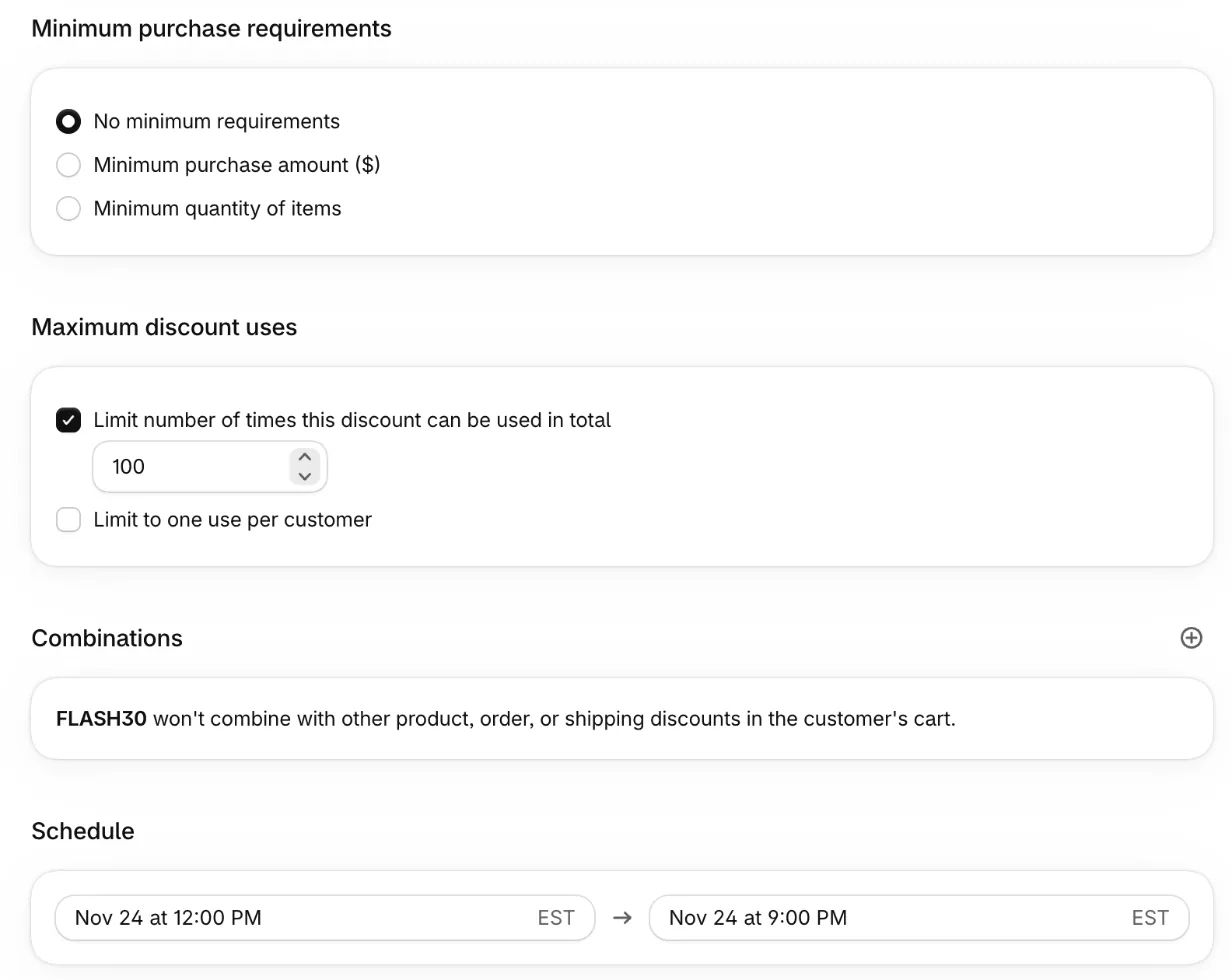
A discount ends by itself, but a sale price you set by lowering Price and filling Compare-at price, the box for the old price, stays until you change it back. A discount also leaves listed prices alone and shows its saving at checkout. The discount code guide covers the rest of the form.
- Cap the uses, for a discount code. Under "Maximum discount uses", tick "Limit number of times this discount can be used in total" and enter the number. A second box limits each customer to one use. The cap counts uses of the code, not units. Shopify holds a use while a payment is pending and releases it if the payment is declined, so a cap can look reached for a moment. An automatic discount has no such box.
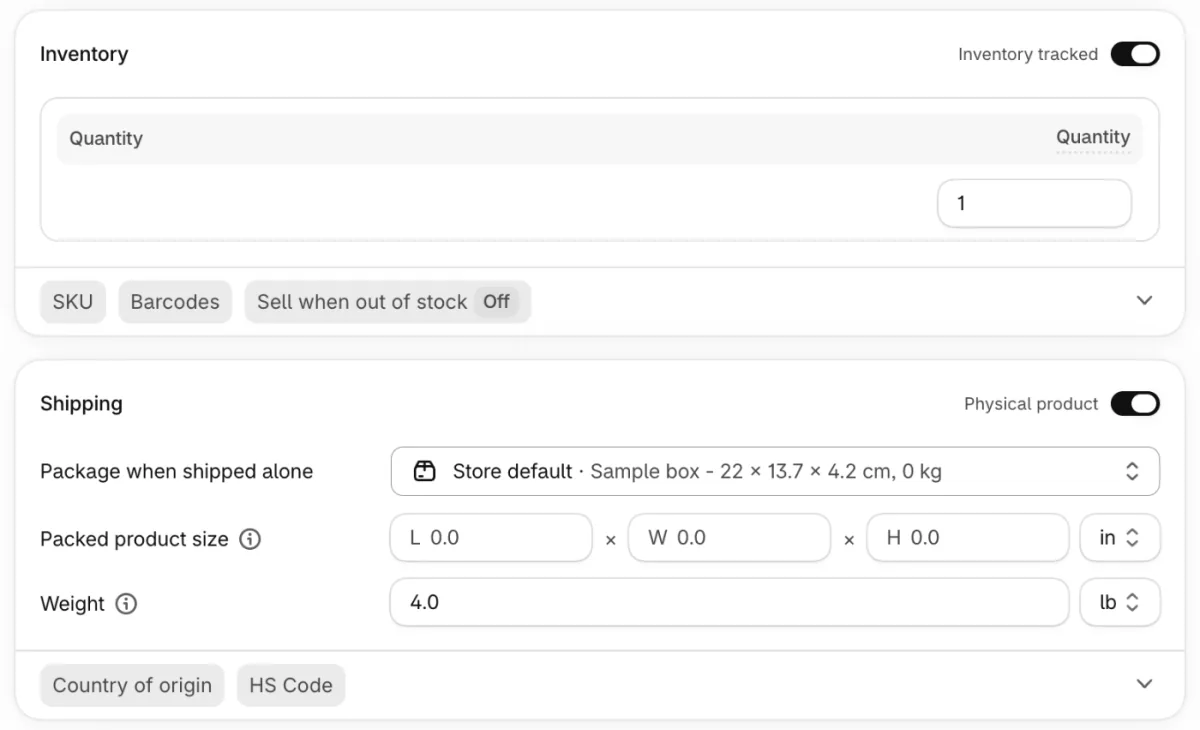
- Set the stock. Open each product, switch "Inventory tracked" on, enter the quantity and leave "Sell when out of stock" off, so the sale stops at zero. Off is Shopify's default, and its Help Center, which calls the setting Continue selling when out of stock, says customers can't buy a tracked item once its stock reaches zero. If stock goes in minutes, hold a few units back. That is advice, not a Shopify rule.
- Show the sale with Shopify alone. A theme's announcement bar usually has no end date. A rollout of the Event type, under Markets, then Rollouts, on Basic and up, publishes the bar text for a set period and then rolls it back. Scheduling a sale banner has the steps. On Shopify Plus, Launchpad, Shopify's own app for timed events, can schedule the whole event in one place.
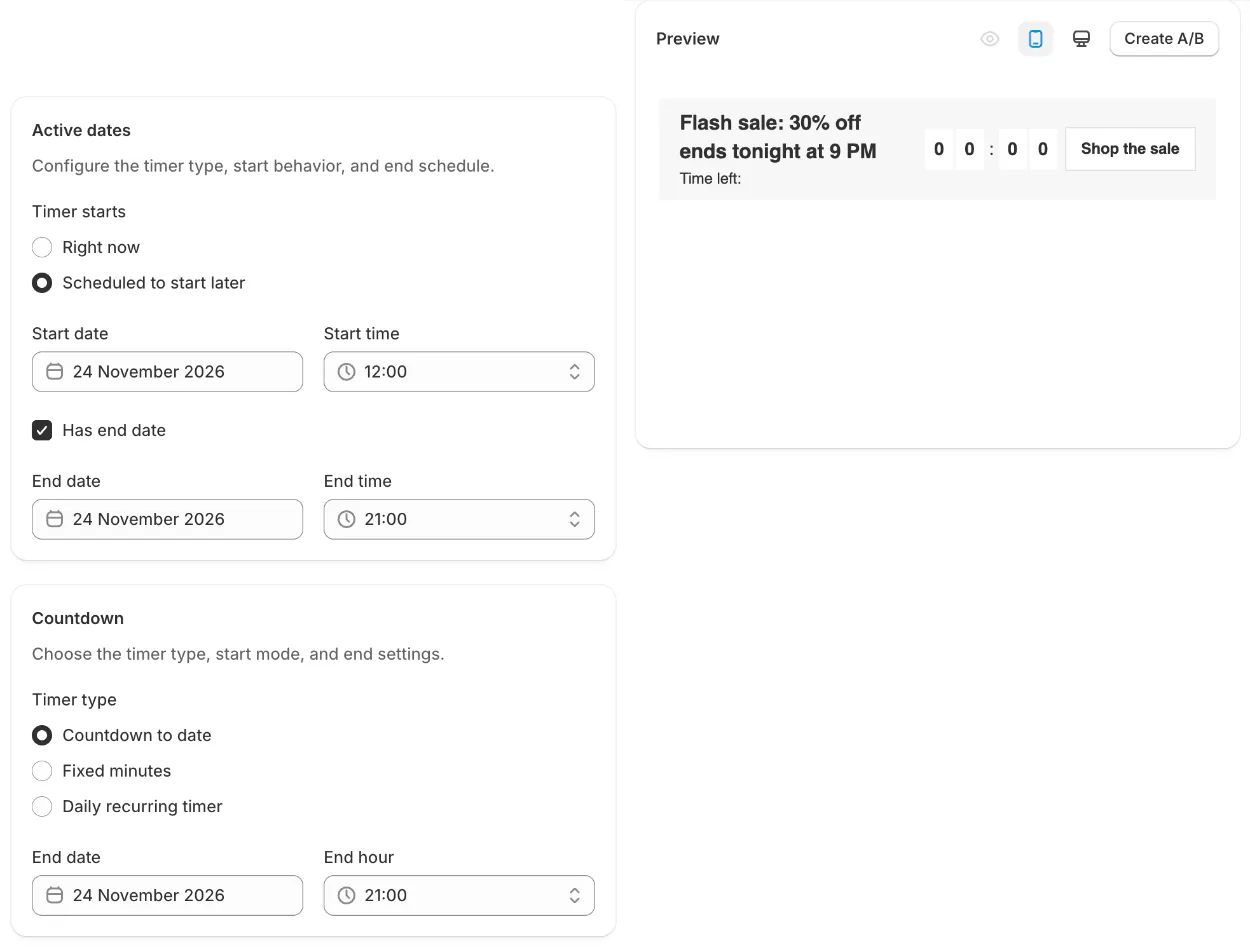
- Show the sale with Sledge. In Sledge's promotions, open Tools, then Promotion. "Banner" shows on collection pages, the search page, the search drop-down and the cart drawer. "Global Countdown" is a site-wide bar with a ticking clock, and "Product Countdown" shows a timer on the product pages you pick. The Banner and Global Countdown forms each have an "Active dates" card: choose "Scheduled to start later", set the start, tick "Has end date" and set the end, in your store's time zone. Set the discount to end on the hour or half hour, because Sledge's pickers step by 30 minutes, and give both forms that same end.
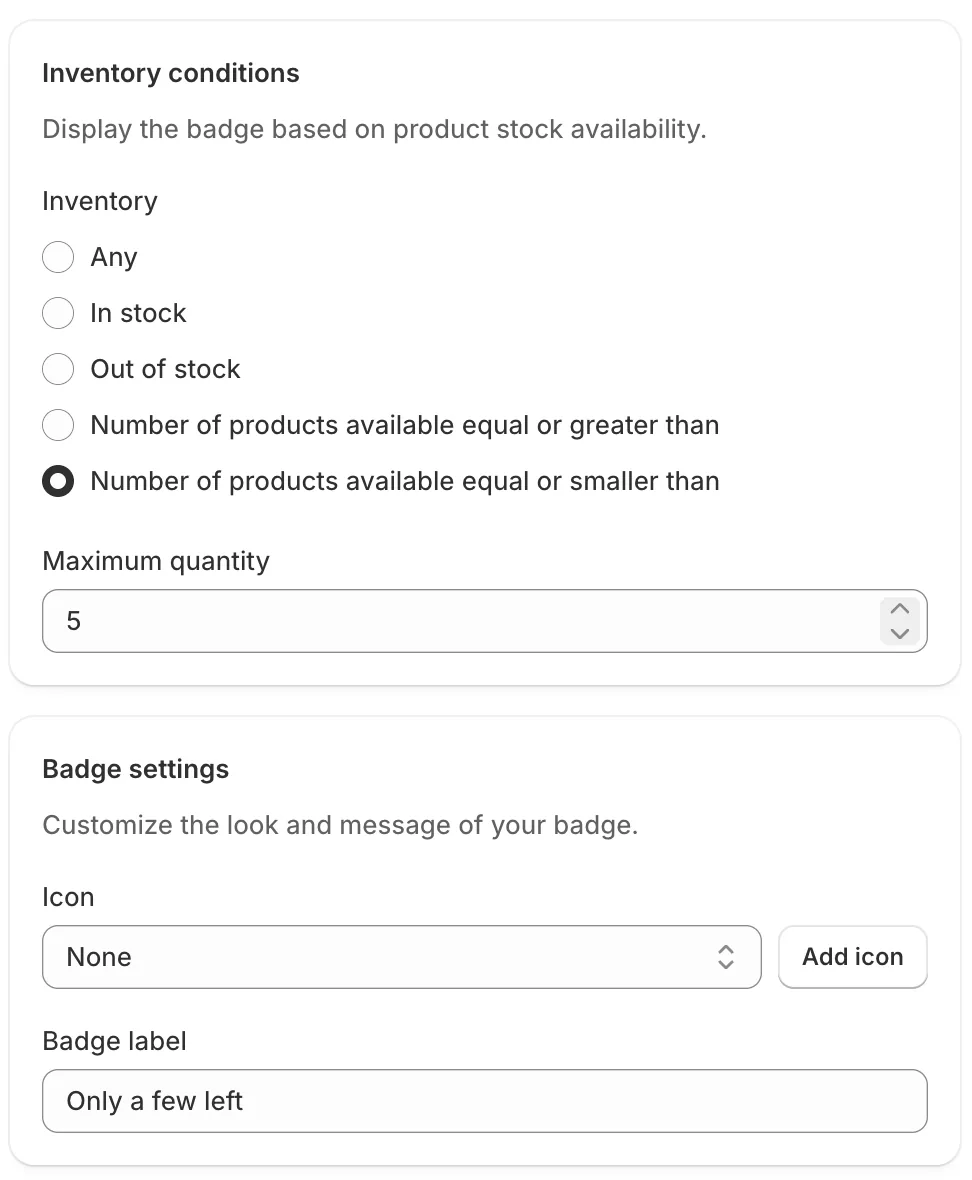
- Show the real stock, then check the store. A badge campaign, under Tools, then Merchandising, then Badge Campaign, can appear only while a product's total stock, across its sizes and colors, is at or below a number. Under "Inventory conditions", pick "Number of products available equal or smaller than", enter a "Maximum quantity" and write the "Badge label", such as "Low stock". Because your own stock count turns the badge on, it is a real signal. A product at zero is also at or below the number, so the badge still matches it once it sells out, and the label should read true there too. The badge form also has an "Active dates" card, so give it the sale's start and end too. Then open the store on a phone at the start time and again after the end time, to confirm the discount, banner, countdown and badge all started and stopped on schedule. Watching your store during a big sale covers the first hour in Live View.
Does a flash sale need a timer?
No. A timer shows how long is left, and only a discount changes what shoppers pay. If you add one, count down to the same end as the discount, because the timer and the discount each keep their own end.
- Sledge's "Countdown to date" reads your end hour as each shopper's own local time. A shopper in another time zone can see zero earlier or later than the discount ends, so name the end time and your zone in the banner text.
- "Fixed minutes" starts again each time it reaches zero. Leave it for sales that repeat, and never use it for a sale that ends once.
- "Daily recurring timer" suits a window that opens each day.
A timer that restarts, or a stock count that isn't real, is the fake kind of urgency that scarcity marketing describes. To put a timer in your theme, see the steps for Dawn and Horizon. A clock set to midnight for New Year's Eve is worked through in New Year marketing ideas.
FAQ
Questions, answered
-

14-day free trial
Explore Sledge on your store before you decide to commit.
-

No credit card required
Start improving your store with no upfront commitment.
-

Setup in minutes
Get Sledge running without a lengthy setup process.
-

Built to grow sales
Turn shopper behavior into actions that help you sell more.
What does flash sale mean?
A flash sale is a discount that lasts only a short, fixed time, from a few hours to about two days, and often covers limited stock. The short end is what makes shoppers buy now. In an online store it needs a discount with an end time and a stock count that stops the sale at zero.
How long should a flash sale last?
Most run between two and 36 hours, says Shopify's guide for large brands. Salesforce calls 24 hours a common choice, 2 to 4 hours suits a VIP or online-only sale, and it says interest tends to drop after two days. Pick the length from your stock and your reason for the sale.
How do you limit a flash sale to the first 100 orders on Shopify?
Create a discount code, not an automatic discount. Under Maximum discount uses, tick Limit number of times this discount can be used in total and enter 100. The cap counts uses of the code, not units in stock, so also set the product's quantity under Inventory.
Does a flash sale need a timer?
No. A timer shows shoppers how long is left. It does not change a price or end a discount, because the discount's own end date does that. If you add one, count down to the same end time, and skip a timer that restarts when it reaches zero.
Should you switch off your apps before a flash sale?
Usually not. In most cases, Shopify's Help Center recommends special preparation only when you expect tens of thousands of customers to start a checkout within a few minutes. Even then, for an app in your checkout, it first suggests telling its developers the volume you expect, and switching it off only if they are not confident.
What can Sledge do for a flash sale?
For a flash sale, Sledge does not set your sale price or limit how many units sell, because Shopify's Discounts and Inventory do that. Sledge schedules what shoppers see: a promotion banner, a global or product countdown and a badge campaign, each with a start and end in your store's time zone.
Show the sale, and take it down on time.
For a flash sale, Sledge doesn't set your sale price or limit how many units sell. It schedules a promotion banner, a global or product countdown and a badge campaign to start and end in your store's time zone. Try it free for 14 days. Growth Intelligence turns on when you pick a paid plan, and its suggested fixes add up to one dollar figure, labeled Est. potential.