These New Year marketing ideas for a Shopify store run from Sunday, December 27, 2026 to Sunday, January 31, 2027. Take Christmas down first, put a countdown and a banner up for midnight on Thursday, December 31, open a sale on Friday, January 1, and let each dated tool end by itself.
It is 11:40 p.m. on Thursday, December 31, and a shopper has your store open, waiting for a sale that starts at midnight. Your banner still says Christmas, nothing counts down, and you are not awake to change it.
When should New Year marketing start, and what goes live on which date?
Start on Sunday, December 27 by taking Christmas down, and have the New Year sale live at 12:00 am on Friday, January 1.
| Date | What goes live |
|---|---|
| Sun, Dec 27 | Christmas comes down (idea 1) |
| Mon, Dec 28 | The collection, countdown, banner, kit and gift go live (ideas 2 to 6) |
| Thu, Dec 31 | New Year's Eve: the countdown runs to midnight and the email goes out (ideas 3 and 8) |
| Fri, Jan 1 | New Year's Day: the weekend sale starts at 12:00 am (idea 7) |
| Sun, Jan 3 | The weekend sale ends |
| Mon, Jan 4 | Restock news (idea 9) |
| Sun, Jan 31 | Everything is switched off (idea 10) |
This plan is a suggestion, not a rule from a source. It starts where Christmas marketing ideas stops, and a content calendar turns the dates into rows. The holiday marketing calendar lists the other 2027 dates.
Some shoppers arrive with a resolution. 31% of Americans planned to make one or set a goal for 2026, and exercising more (25%), eating healthier (22%) and saving more money (21%) were among the top goals, according to YouGov's poll of 1,104 US adults in December 2025. Name the goal your products serve, then send shoppers to it (idea 2).
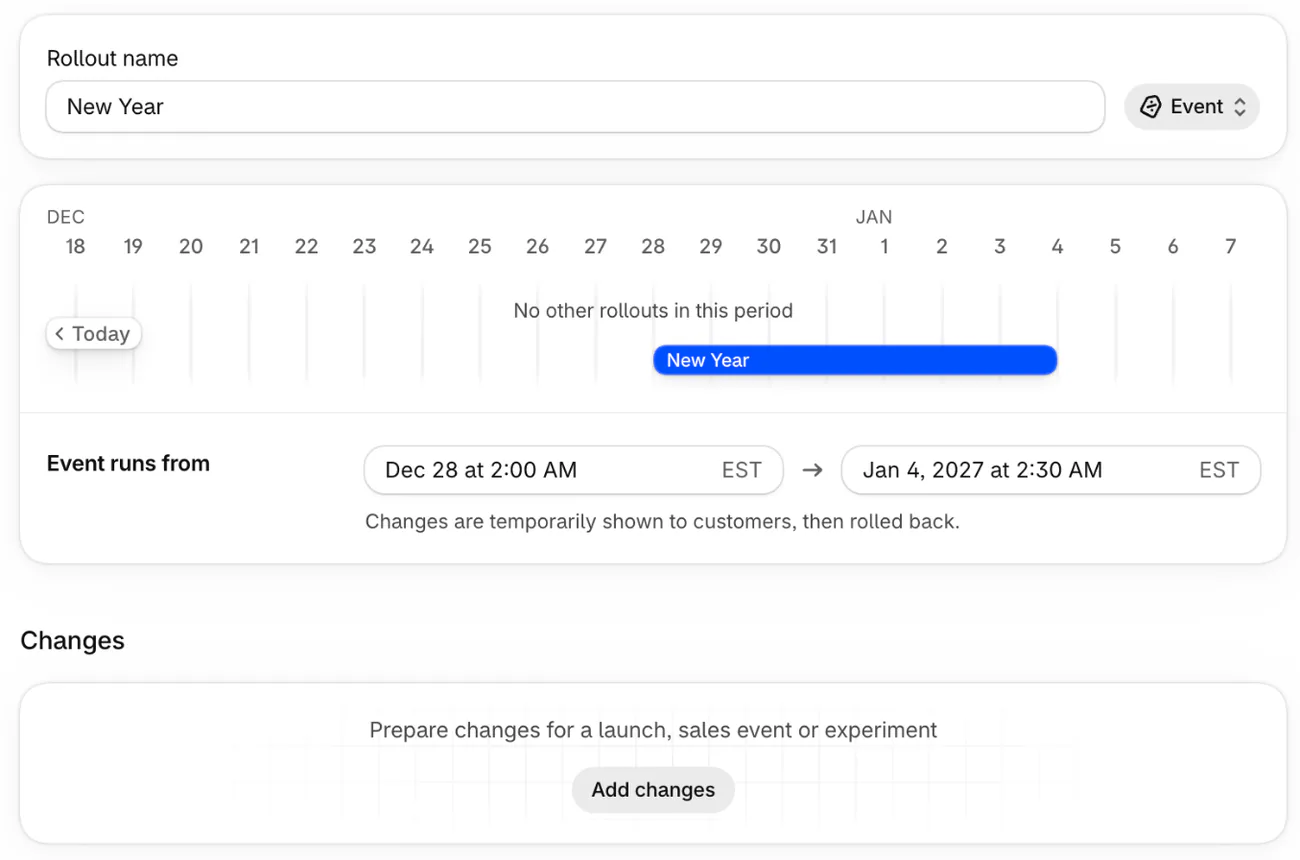
To publish the Shopify side of the plan for set dates, create an "Event" rollout under Markets, then Rollouts. It publishes changes for a set period, then rolls them back. It needs the Basic plan or higher, and its dates follow your store's time zone. Shopify Editions shows what a rollout can hold.
Which New Year marketing ideas get your storefront ready?
Take Christmas down, give resolution shoppers one place to land, then put the date on a clock and a banner.
1. Take Christmas down first
Four places can still hold Christmas on Sunday, December 27.
- The announcement bar. A theme's announcement bar usually has no end date, so a Christmas line stays until you edit it. The announcement bar guide shows how to hide it.
- Discounts. Open Discounts and check that no Christmas offer still reads Active, because a discount made without an end date never expires. An after-Christmas sale may run on, but end it on December 31 so it does not overlap the New Year sale (idea 7) on January 1. Two promotions at once covers overlaps.
- Sledge. A Christmas banner, kit, gift or countdown in Sledge, a Shopify app for search, filters and offers, has no end date if you started it with "Right now", because the end-date fields show only under "Scheduled to start later". A "Fixed minutes" countdown starts over each time it reaches zero. Open each one and switch it off with its Status.
- Your pages. An "order by December 15" line on a product or policy page is wrong now.
A change held in an Event rollout undoes itself at the rollout's end date.
2. Give resolution shoppers one place to land
Tag the products that serve one goal first, because the collection form offers only tags that already exist. The bulk editor tags many at once.
Then go to Collections and click "Add collection". Add a condition, pick "Tag", "is" and your tag, then add a second condition, "Inventory stock" greater than 0, so sold-out products drop out. Set it to match all conditions. Name the collection for the goal, not for the year.
Ideas 4 and 7 point at this collection, and Sledge's search and filters work on it too. Shopify collections covers the form.
3. Count down to midnight
A theme's announcement bar shows words, not a clock, so a midnight sale usually needs a clock from elsewhere. Sledge's Global Countdown is a clock bar across your store. In its "Countdown" card, set the Timer type to "Countdown to date", the End date to January 1 and the End hour to 00:00. The hour list runs in half-hour steps from 00:00 to 23:30, so midnight is the first choice on it. The clock reaches zero at each shopper's own midnight and then hides itself.
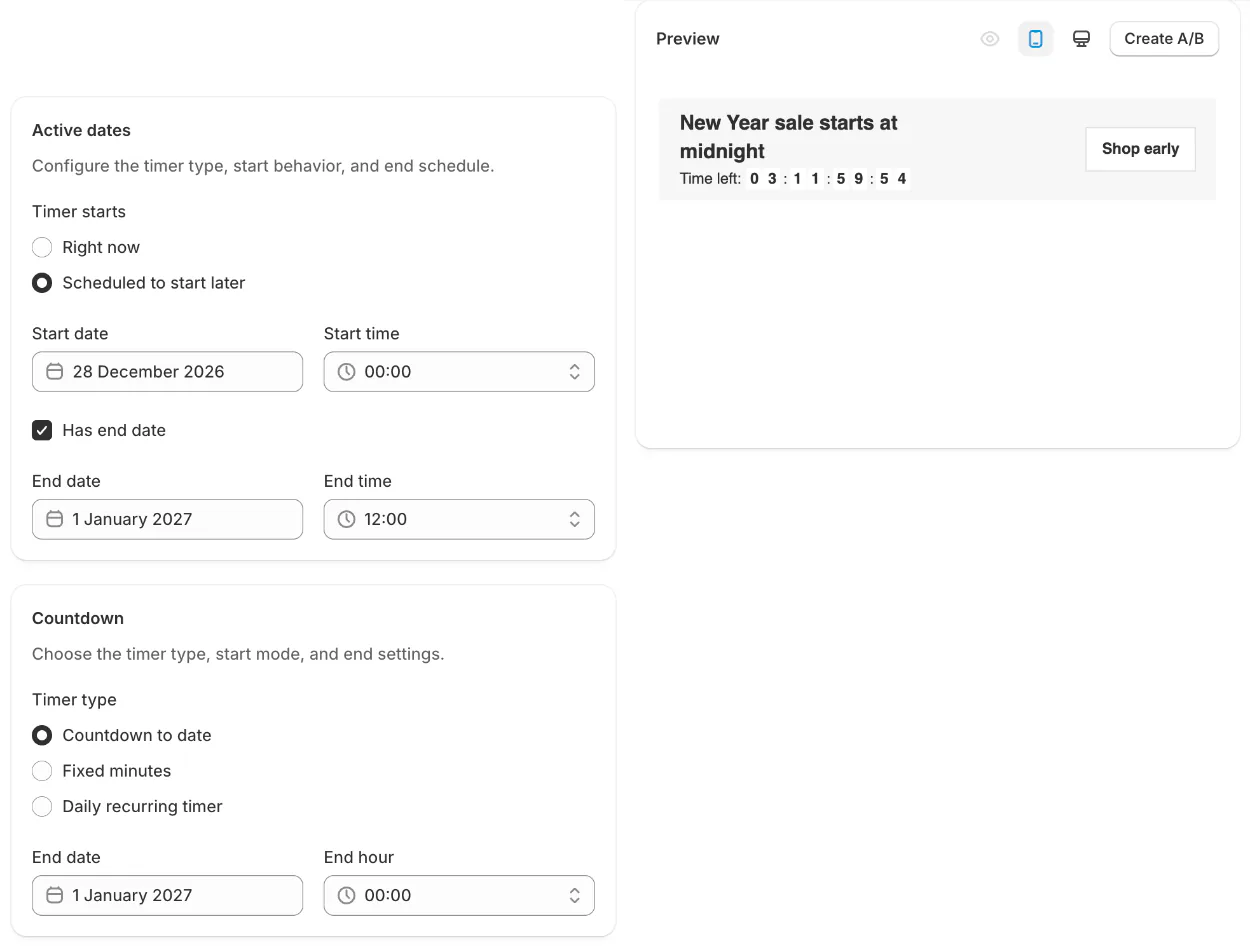
The other card, "Active dates", sets when the clock appears at all, and it follows your store's time zone. Pick "Scheduled to start later", start it on December 28, tick "Has end date" and end it at noon on January 1. Say your store is in New York and a shopper is in Los Angeles: their midnight comes three hours after yours, and a noon end leaves them time to reach it.
4. Say it where shoppers browse
Put the date where shoppers browse, not only in a strip at the top. Sledge's Banner shows a message on the "Collection Page" (on by default), "Search Page", "Instant Search" and "Cart Drawer", and has no slot on the product page or the home page.
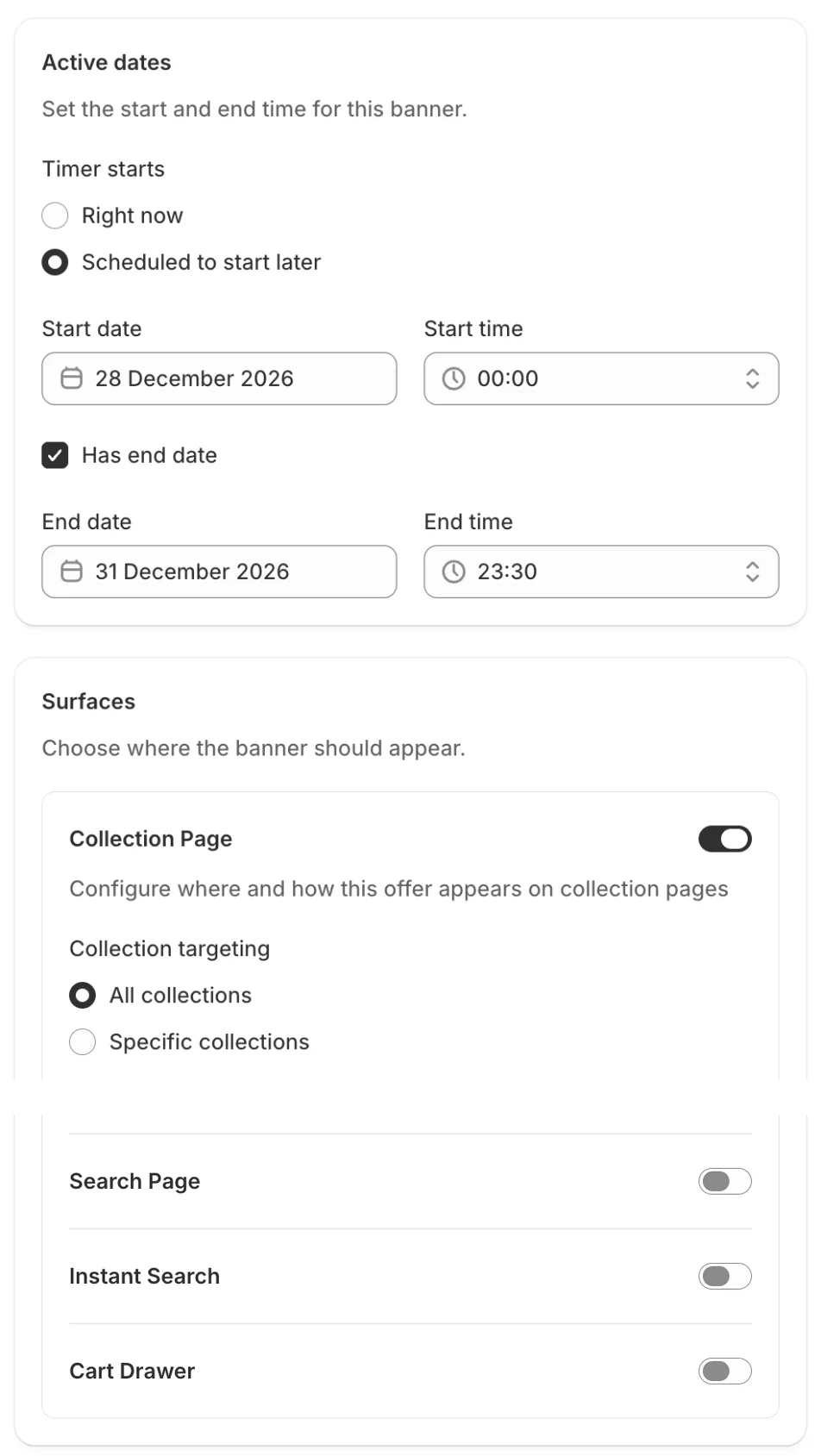
With its own "Active dates", one banner can say "Sale starts at midnight" through December 31, and a second can say "Sale on until Sunday" from January 1. The time lists include 00:00, so end the first banner at 00:00 on January 1 and start the second then, with no gap. The picture stops at 23:30, which would leave half an hour with no banner. Tick "Add button" and put the collection from idea 2 in "Redirect URL", the page a click opens.
Leave the Cart Drawer switch off here, because saving a banner with it on also changes your cart drawer's own settings. Scheduling a sale banner shows the Shopify route and the Sledge one.
Which New Year promotion ideas suit a shopper starting fresh?
Sell the routine as a kit, reward a bigger cart with a free gift, and run one sale over the long weekend.
5. Sell a fresh-start kit
A fresh-start kit sells a routine as one purchase: say a water bottle, a lunch box and a notebook at one price. Shopify Bundles, Shopify's free app, makes fixed bundles and multipacks. Sledge's Fix Bundles prices the set under "Discount", as a "Percentage" or a "Fixed amount", and shows it on the product page, collection pages and search results.
The kit's "Active dates" card can start it on December 28 and stop it on January 31, and a "Countdown" switch adds a clock to it. If any part of the kit sells out, the whole kit shows as sold out, so check each part's stock first. A kit's discount combines with others only where Shopify's rules allow.
Bundle ideas compares the bundle types, and Sledge bundles lists the offers.
6. Add a free gift for a bigger cart
Sledge's Free Gift adds the gift to the cart once it reaches your goal, so nobody has to remember to add it. You set the goal under "Progress goal" as "Minimum quantity" or "Minimum purchase", with a number in "Value". Say any three items earn a free notebook: pick "Minimum quantity" and 3.
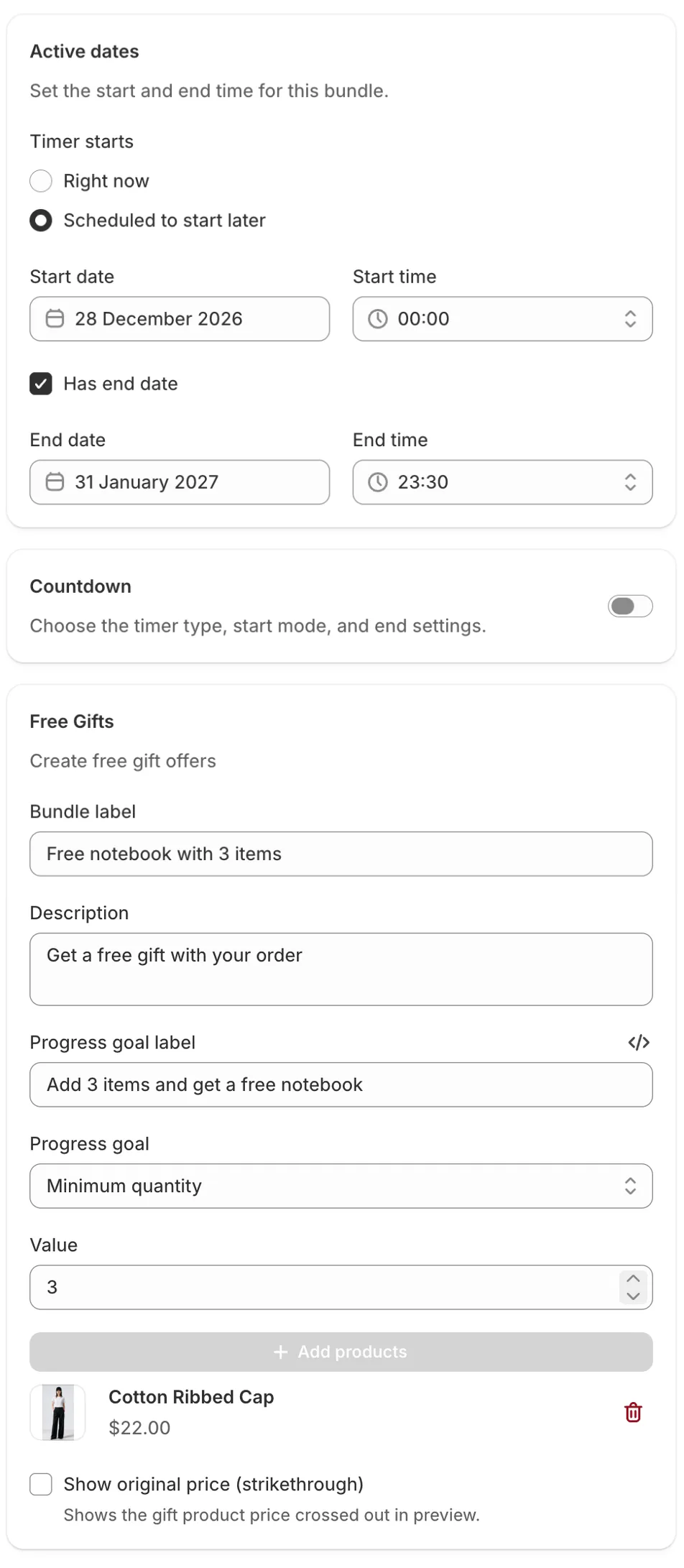
An offer holds one gift product and one goal, never a ladder of gifts. Its "Active dates" can run from December 28 to January 31. In Shopify alone, a Buy X get Y discount leaves the free item for the shopper to add, as its Help Center says. The free gift setup guide runs the margin sum and Shopify's route.
7. Run one sale from Friday to Sunday
New Year's Day is a Friday, so one automatic "Amount off products" discount can cover the long weekend. Apply it to the collection from idea 2, set the start to January 1 and click "Set end date" for Sunday, January 3, with an end time of 11:59 pm so Sunday is covered. Both live on the "Schedule" card, the part of the form that sets when the discount runs.
Shopify starts the discount at 12:00 am store time on its start date. A Sledge Active date follows the same clock, and the countdown from idea 3 does not. If most shoppers share your time zone, the two agree. If not, the clock ends at each shopper's midnight and the discount still starts at yours.
If you cross out a "was" price, it has to be the actual price you offered to the public on a regular basis for a reasonably substantial time, as the FTC's former-price guidance asks. The form is in how to create a discount code, and flash sale has a one-day version.
Who should hear about the New Year campaign first?
Last January's buyers, with the date, scheduled ahead.
8. Email last January's buyers first
Shoppers who ordered from you last January already know your store. Open Messaging, Shopify's email tool, and click "Create message". In the "To" field, click "Create segment" and filter for customers who placed orders between January 1 and 31, 2026. Only those who agreed to marketing emails receive the message.
Click "Review", then "Schedule send", pick "Custom date and time" and set a send date and time. Thursday, December 31 in the morning puts the email in the inbox before the countdown reaches zero. Messaging needs the Basic plan or higher, and its cost is in the FAQ below.
Gift card holders get their own email in newsletter ideas. Shopify email marketing covers the costs, and win back email suits shoppers who went quiet.
Which January marketing ideas keep going after the sale?
Tell shoppers when a December sell-out is back, then switch the dated tools off and keep the rest.
9. Tell shoppers when a December sell-out returns
A product that sold out in December may still have shoppers who want it. Sledge's Back in Stock, on the Accelerate plan and up, lets a shopper ask to be told by email when it returns, per product. Its "Subscribed products" tab lists each product with the quantity you have beside the number of people waiting, so the product with the most people waiting is a good first reorder.
For a product with stock on the way, Sledge's Pre-order, on every Sledge plan, takes orders before it lands. Notify me or pre-order says which to switch on, and inventory management covers the reorder.
10. Switch it all off, then plan the next date
Before January 1, write down what ends by itself and what you remove by hand.
| What you set up | What ends it |
|---|---|
| The Global Countdown | A "Countdown to date" hides itself at zero. A "Fixed minutes" one ends only with its Active dates. |
| The banner, the kit and the gift | Their Active dates, with "Has end date" ticked. |
| The weekend sale and an Event rollout | Their end dates. |
| The Christmas line in the announcement bar | You, by hand. |
"Scheduled to start later" is the choice that shows those end-date fields at all, so pick it for every Sledge tool on this page.
Giveaways, referral programs and retargeting ads have no setup on this page. Giveaway ideas, referral marketing and retargeting ads cover them.
FAQ
Questions, answered
-

14-day free trial
Explore Sledge on your store before you decide to commit.
-

No credit card required
Start improving your store with no upfront commitment.
-

Setup in minutes
Get Sledge running without a lengthy setup process.
-

Built to grow sales
Turn shopper behavior into actions that help you sell more.
When should you start New Year marketing?
Start on December 27, where Christmas marketing stops, and take Christmas down first. Switch the countdown, banner and kit on from December 28, and have the sale live at 12:00 am on Friday, January 1. Starting earlier than that means your store is still selling Christmas, so a New Year message competes with your own.
What are good New Year marketing ideas for a small online store?
Sell a fresh-start kit, run one sale from Friday, January 1 to Sunday, January 3, and put the date on a countdown and a banner. Email last January's buyers first. YouGov's December 2025 poll found 25% of Americans planned to exercise more and 22% to eat healthier, so name the goal your product serves.
How do you run a New Year sale on Shopify?
Create an automatic Amount off products discount, apply it to a collection, set the start to January 1 and click Set end date for the last day. Shopify starts and ends it by your store's time zone, at 12:00 am on the start date. An Event rollout under Markets, on Basic or higher, publishes your other changes for set dates.
Does a New Year's Eve countdown end at midnight for everyone?
A Sledge countdown set to 00:00 on January 1 ends at each shopper's own midnight, because its End hour is read on their device clock. Its Active dates follow your store's time zone. Say your store is in New York: a shopper in Los Angeles reaches midnight three hours later, so end the Active dates at noon on January 1.
Which dates matter for New Year marketing in 2026 and 2027?
New Year's Eve is Thursday, December 31, 2026, and New Year's Day is Friday, January 1, 2027, a US federal holiday, so check your carrier's own holiday dates before you promise a ship date. Lunar New Year is Saturday, February 6, 2027, and Valentine's Day is Sunday, February 14, so a plan that ends on January 31 clears both.
How much does a New Year email cost on Shopify?
Shopify Messaging is included from the Basic plan upward and sends 10,000 emails a month free. After that it charges $1 USD per 1,000, and abandoned checkout emails are always free. Say you email 2,500 subscribers three times that month: that is 7,500 emails, all inside the free 10,000. Use Schedule send to set each date ahead.
Start the New Year at midnight, and take it down on time.
Sledge doesn't run your email campaigns, buy ads or post to social. It covers the storefront side of the New Year: a countdown to midnight, a banner on collection and search pages, a fresh-start kit and a free gift, each with start and end dates. Try it free for 14 days. Growth Intelligence turns on when you pick a paid plan, and its suggested fixes add up to one dollar figure, labeled Est. potential.