To migrate from Magento to Shopify, export your products and customers from Magento as spreadsheet files, reshape them to Shopify's columns and import them. Shopify's free Store Migration app doesn't list Magento. Orders, reviews and content pages need a migration app, a Shopify Partner or your own hands.
Say you export 800 products from Magento and open the file. A jacket in four sizes takes five rows, and the top row lists all four sizes in one cell. Its categories sit in one cell, with slashes between levels, and its pictures are folder locations, not web addresses.
What moves from Magento to Shopify, and what stays behind?
Products and customers move by file, and orders, reviews, customer-group prices, pages and your theme need an app, a Shopify Partner or your own hands.
| In Magento | What it becomes in Shopify | How it moves |
|---|---|---|
| Products and their sizes and colors | Products, up to three options each | Shopify's own import or a migration app |
| Categories | Collections and tags | A Collection column, a Tags column or by hand |
| Attributes such as fabric | Custom product details, tags, vendor or product type | Created in Shopify first, then filled in the file |
| Customers | Customers, without passwords | Two files merged into one |
| Customer groups and tier prices | B2B companies, catalogs and volume pricing | Rebuilt in Shopify |
| Orders | Orders | A migration app |
| Reviews | Reviews | A review app, or a migration app that lists reviews |
| Content pages and blocks | Pages | By hand, since blocks have no direct parallel |
| Extensions and theme | Apps and a theme | Rebuilt |
From Shopify's guide for Magento teams and its post on the Store Migration app, read November 24, 2026.
Which way should you move a Magento store to Shopify?
Shopify's free Store Migration app doesn't list Magento, so you reshape the files yourself or hand the job to a migration app or a Partner.
- Shopify's own import. You edit the Magento files to Shopify's layout, as the next sections show.
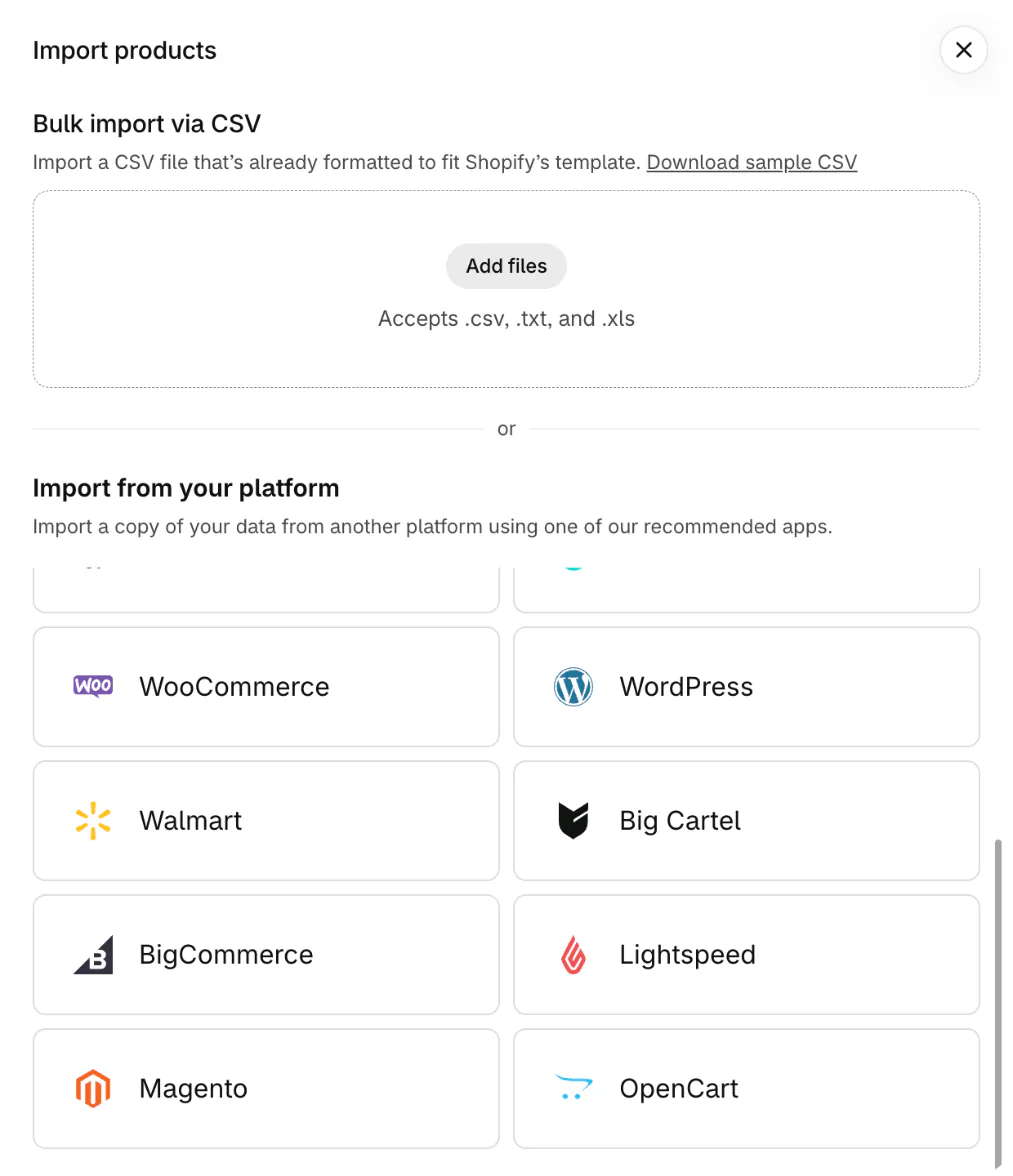
- The free app. Its App Store listing, read November 24, 2026, names eight platforms and none is Magento. Shopify's Help Center has migration guides for ten platforms and none for Magento. Under Products, then Import, the "Import from your platform" section does show a Magento tile. Clicking it opens six recommended migration apps, among them Matrixify, LitExtension and MigrationPro, and not Shopify's own app.
- A migration app that names Magento. Three that do are listed below, in alphabetical order.
- A Shopify Partner. Shopify's Plus launch checklist says a spreadsheet suits simpler catalogs, and Shopify's guide for Magento teams points configurable products, customer group pricing and several stores to a Partner. How to hire a Shopify expert covers when it pays.
| App | What its listing says it moves | What its listing says about price |
|---|---|---|
| LitExtension Store Migration | Products, customers, orders, reviews and coupons, with redirects | Free to install. A free demo covers 20 products, 20 orders and 20 customers, then the price follows what you migrate. Billed in USD |
| Matrixify | Data by file, including orders, pages, blogs and redirects, with a Magento migration | A free Demo plan that caps each file at 10 products, 10 customers and 10 orders, then monthly plans |
| MigrationPro | Products, customers, orders, collections, images and redirects | Free to install, with a trial migration first. The price follows what you migrate, with no subscription. Billed in USD |
App prices change, so read an app's own page before you pay. If you sell in more than one country, Shopify Markets sets currency, language and pricing by location once the catalog is in.
Try the whole move in a development store first, as Shopify's guide suggests. Move products first, then customers, then orders, and the sections below follow that order. How to migrate to Shopify adds the launch checklist and Google's view of a site move. The free app doesn't list BigCommerce either, and how to migrate from BigCommerce to Shopify covers that move.
How do you export your products from Magento?
Magento exports products as a spreadsheet under System, then Data Transfer, then Export. In Adobe's guide, you set Entity Type, the box that picks what to export, to Products. Then keep the format on CSV, a spreadsheet file, and click Continue.
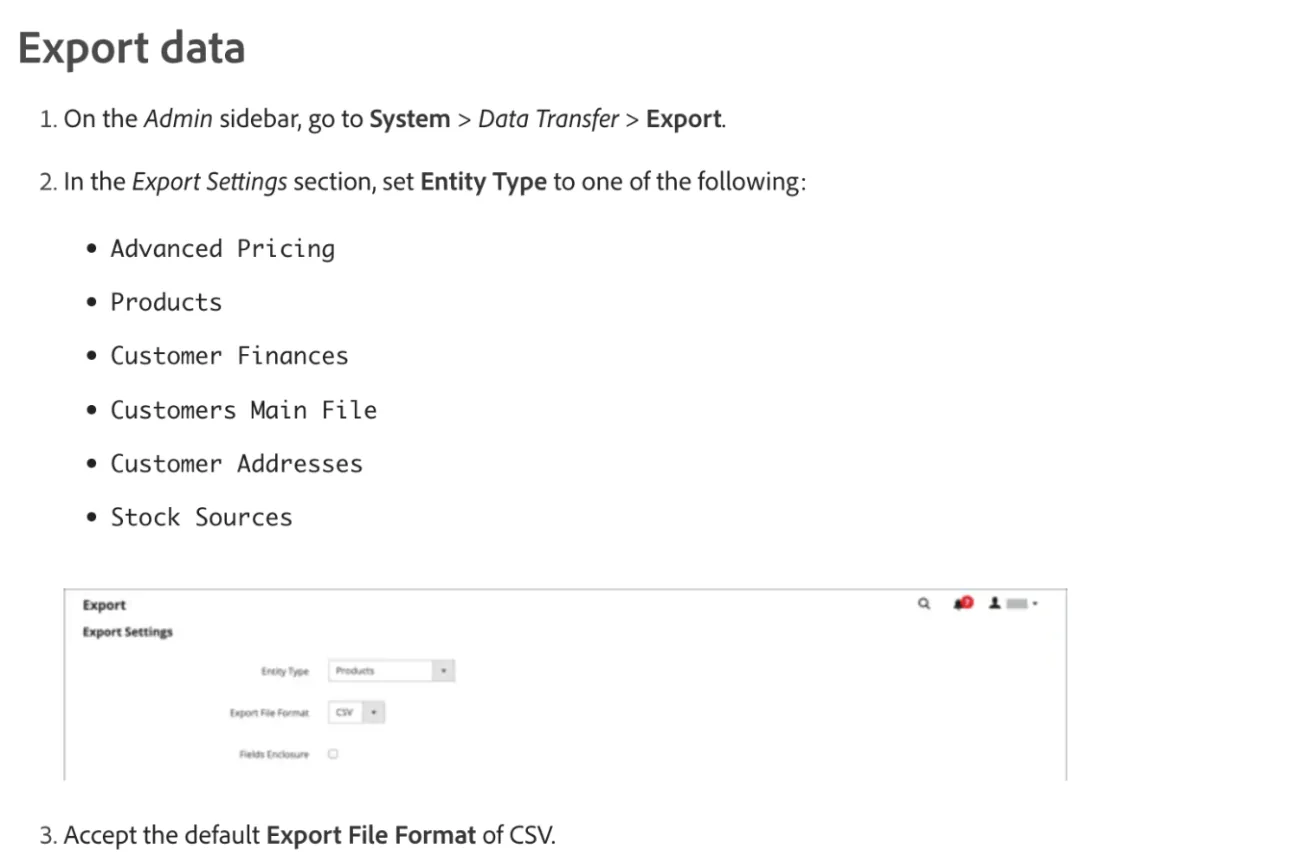
Magento builds the file in the background, and Adobe says the store's scheduled tasks must be running, so ask whoever hosts the store if it never appears. Advanced Pricing holds your tier and group prices, and Customers Main File and Customer Addresses are the two customer files. Adobe's guide is written for Adobe Commerce, the paid edition, so check that a Magento Open Source store shows the same screens.
Back up the store before you close it, and keep it online until Shopify has downloaded your pictures during the import.
How do you reshape Magento's products for Shopify's file?
Each Magento size or color row becomes a Shopify variant row, and a product can have at most three options, such as size and color.
Magento writes a configurable product as one row for the product plus a row for each variation. Shopify's file puts the product's details and first variant on its first row. Each further variant gets its own row with the same URL handle, the last part of the product's web address, and one option value. Your jacket's five rows become four, one per size.
| In your Magento file | In Shopify's file | What you do |
|---|---|---|
| A product with a row per size or color | One product with Option name and Option value columns | Give each value its own row, with three options at most |
| Attributes such as fabric or brand | Custom product details, tags, vendor or product type | Define the custom detail in Shopify first, and it becomes a column in Shopify's product export. A detail that differs by size or color can't go in the file, so set it in the bulk editor |
| Categories | A Collection column and a Tags column | Collection takes one collection per product, and you add that column yourself, so also put every category name in Tags |
| A special price with dates | Price and Compare-at price | Put the sale price in Price and the original in Compare-at price. The file has no columns for sale dates, so use a special price only for a sale that is on now |
| Quantity | Inventory quantity | Type shopify in the inventory tracker column, or Shopify doesn't track the stock. The quantity column suits a store with one location |
| Pictures as folder locations | Product image URL | Each picture needs a full web address anyone can open, so build each one from your store's web address, the folder your pictures sit in and the path in the file, then open one in a browser to check it loads |
Magento's side from Adobe's guides to product data and configurable products, and Shopify's from its product file reference, read November 24, 2026.
Shopify's file has no columns for Magento's related, cross-sell and up-sell lists or for grouped products. For a Magento bundle product, you rebuild it in Shopify's free Bundles app or another bundle app.
Once the category names are in Tags, make each collection: open Products, then Collections, click "Add collection", click "Add condition" and choose "Tag". How to migrate from WooCommerce to Shopify shows the same form.
Upload the file under Products, then Import, then "Add files", and untick "Publish new products to all sales channels" to publish only to your online store. To review first, add a Status column with draft on each row, then set the products to Active with the bulk editor. For the 15 MB limit, what a blank cell erases and pictures that fail to load, see How to import products to Shopify. To go past three options, see Shopify variants.
How do you move Magento customers to Shopify?
Magento exports customers as two files, one for accounts and one for addresses, and Shopify's customer file holds one default address per customer.
Export Customers Main File and Customer Addresses from the same screen. The address file has a row per address, linked to its account by email, with a flag for the default. Keep one row per customer, and copy that default into Shopify's address columns.
The main file holds a group number, not a name, so look up your group names in Magento and write each one in the Tags column. Passwords can't move, so Shopify says to invite customers to create new ones. With Shopify's customer accounts they sign in with a one-time code instead. Set Accepts Email Marketing to yes only for people who opted in.
Under Customers, click Import, add the file in the "Import customers by CSV" window and tick "Add tags to customers in this CSV and use these tags to create a segment". Then type a tag for this batch, and Shopify makes a segment of everyone in the file. See How to import customers to Shopify for the file in full.
How do you move Magento orders and reviews?
Neither comes from Adobe's export list or Shopify's own import, so orders need a migration app and reviews need an app that moves them.
Shopify's migration guide points to migration apps for past orders and offers no spreadsheet for them. Import products and customers first, so every order can link to both. Shopify's Plus launch checklist says to bring at least the orders inside your return window and recommends the past two to five years.
Before you import orders, switch off new-order notifications under Settings, then Notifications, then Staff notifications, because each imported order emails every staff member who gets them. Shopify's own import takes no reviews, LitExtension's listing says it moves them, and a review app that imports reviews is the other route. Read an app's own page before you pay, and see Shopify review apps and their free plans.
How do you rebuild Magento's layered navigation on Shopify?
Rebuild the sidebar from the attributes Magento filtered by: make each one an option, a tag or a custom product detail in Shopify, then add it as a filter. Layered navigation is Magento's name for the sidebar where shoppers narrow a category by size, color or price, and elsewhere it is called faceted search.
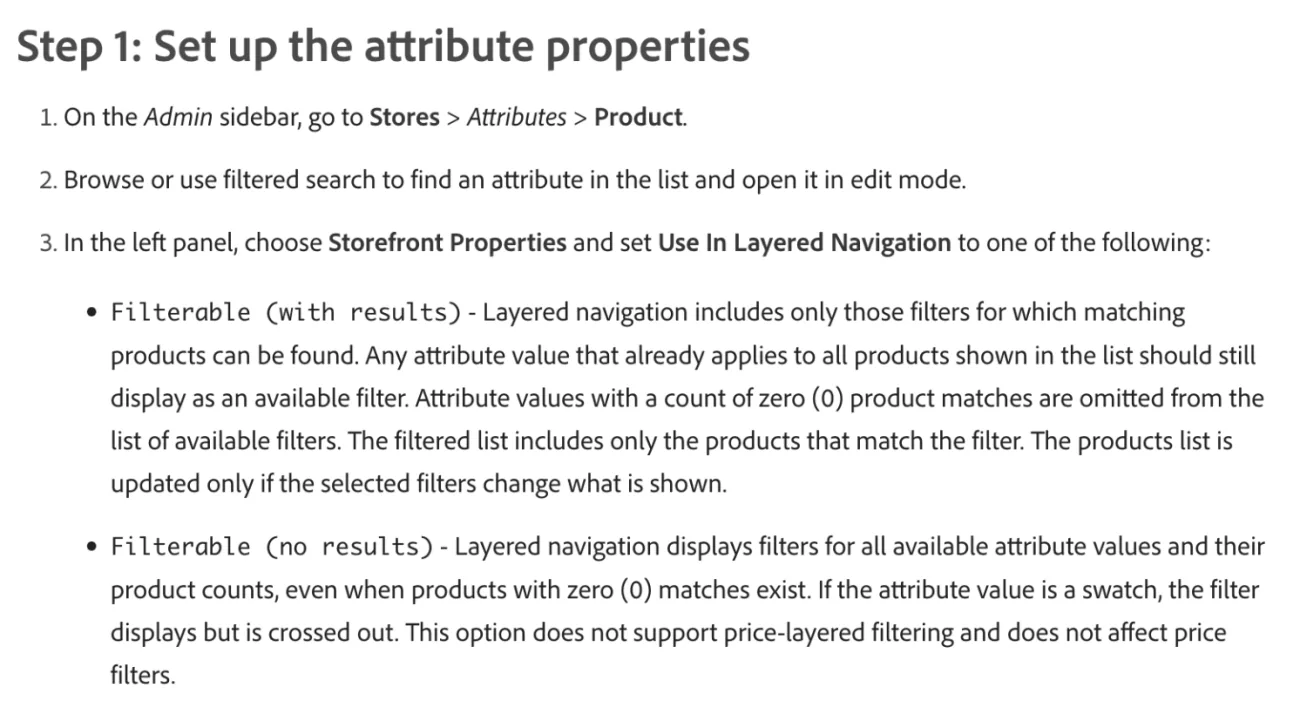
To list your filters, open Stores, then Attributes, then Product in Magento, and check each attribute's Storefront Properties. Adobe's guide says an attribute shows in the sidebar when "Use In Layered Navigation" is set to Filterable (with results) or Filterable (no results).
After the import, a size or color is a product option, and anything else, such as fabric, can be a tag or a custom product detail. Shopify's free Search & Discovery app builds filters from availability, category, price, product type, tags, vendor, options and custom product details. It allows up to 25 filters a store and 100 values a filter, and shows none on a collection with more than 5,000 products. Shopify filter limits covers them, and filtering collections by a custom product detail has the steps.
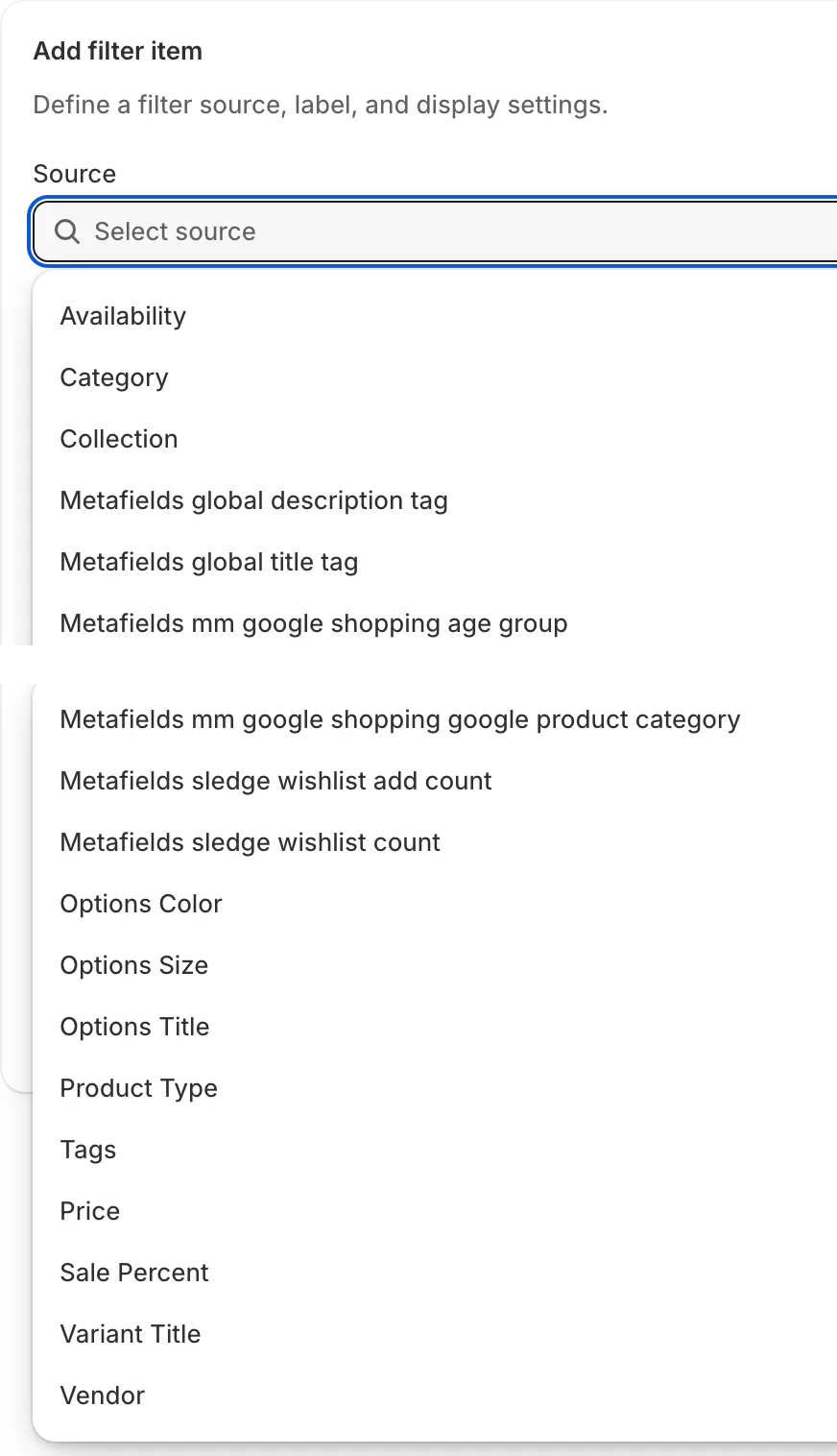
Sledge is a Shopify app for search, filters, bundles and upsells, and it works once your products are in Shopify. In its Product Filter, "Add filter item" has a Source box that lists Collection, Tags, Vendor, Product Type, Price, each option such as Options Size, and your custom product details under the label Metafields. Its filters show on collection pages and on search results.
Sledge's search has a Field Priority screen where you switch product details on or off for search. Tags is one of them and starts off for a new store, so check that it is on if your categories live there. Search can find up to 10,000 products on Pro and 200,000 on Scale, with no cap on Accelerate and Ultimate.
How do you keep your old Magento links working?
Each old address needs a URL redirect to its new page, and Magento can have more old addresses than you have products.
| Old Magento address, by your settings | Shopify address |
|---|---|
| yourstore.com/jacket.html | /products/jacket |
| yourstore.com/men/jackets.html | /collections/jackets |
| A content page | /pages/name |
Adobe's guide says product and category addresses can end in .html or .htm, and a product address can include its category path, so one product can answer at two addresses. List every live address from Magento's URL Rewrites screen, under Marketing, SEO & Search, where a Request Path column shows them, or from your sitemap or Google Search Console.
Adobe's guide also shows a category address with a choice after a question mark, so check whether your sidebar choices add one. Shopify says a redirect might not work as expected on an address with a question mark, so redirect the category address and don't plan one redirect per choice.
In Shopify, open Content, then Menus, click "View URL Redirects" and then "Create URL redirect". Fill in "Redirect from" and "Redirect to", and click "Save redirect". A redirect works only on an address that shows Page not found. Shopify can't redirect addresses that start with /apps, /application, /cart, /carts, /orders, /services or /shop, and it allows up to 100,000 redirects, or 20,000,000 on Plus.
Keep the store password on while you test, and place a test order before you switch the domain. How to migrate to Shopify and Shopify URL redirects have the full steps and Google's wording on site moves.
FAQ
Questions, answered
-

14-day free trial
Explore Sledge on your store before you decide to commit.
-

No credit card required
Start improving your store with no upfront commitment.
-

Setup in minutes
Get Sledge running without a lengthy setup process.
-

Built to grow sales
Turn shopper behavior into actions that help you sell more.
Does Shopify's Store Migration app work with Magento?
No. Its App Store listing, read November 24, 2026, names Square, WooCommerce, Etsy, Wix, Amazon, eBay, Clover and Lightspeed R/X, and Shopify's Help Center has no Magento guide. A Magento store moves by spreadsheet under Products, then Import, or through a third-party migration app that names Magento on its own listing.
How much does it cost to migrate Magento to Shopify?
Shopify's spreadsheet imports and Store Migration app are free, though the app doesn't list Magento. Migration apps set their own prices: LitExtension and MigrationPro bill in US dollars by what you migrate after a free demo, and Matrixify has a free demo plan before its monthly plans. A Shopify Partner quotes its own price.
Do you need Shopify Plus to move from Magento?
No. Shopify's Help Center gives a Plus store the same kinds of route: a spreadsheet, a migration app, a migration service or custom work. Shopify B2B runs on Basic, Grow, Advanced and Plus too. Plus raises limits a big catalog can hit, such as 20,000,000 URL redirects instead of 100,000. Our Shopify Plus pricing guide has the cost.
Can you hire someone to migrate Magento to Shopify?
Yes. Shopify's Help Center lists hiring a Shopify Partner as one of five ways to migrate, and Shopify's guide for Magento teams points to a Partner when customer group pricing or several stores are involved. Each Partner sets its own price, so ask for a written quote that names what moves and who rebuilds the rest.
What happens to Magento tier prices and customer groups?
They have no column in Shopify's product file. Adobe keeps them in a separate Advanced Pricing export. Shopify's counterpart is B2B, with companies, catalogs and volume pricing, on Basic, Grow, Advanced and Plus. Basic, Grow and Advanced can assign up to 3 active catalogs, and Plus has no limit. You rebuild each group and price break in Shopify yourself.
Does Sledge migrate a Magento store?
No. Sledge is a Shopify app for search, filters, bundles and upsells, and it moves no products, customers, orders, reviews or redirects. Once your catalog is in Shopify, its filters can read your collections, tags, vendor, options and custom product details, and its search can read your tags. Plans start at $29.99 a month after a 14-day free trial.
Your sidebar filters stayed on Magento. What replaces them?
Sledge doesn't run on Magento, and it moves no products, customers, orders or reviews. On Shopify, its filters help shoppers narrow your catalog by size, color, price, tags and custom product details. Try it free for 14 days, then plans start at $29.99 a month with no cut of your sales. Growth Intelligence turns on when you pick a paid plan, and its suggested fixes add up to one dollar figure, labeled Est. potential.