Switching from Wix to Shopify moves your products and customers by file. Wix says it can't export reviews, blog posts or digital products, and Shopify's Store Migration app drops the options of any product that has four or more. Orders need a migration app, and you pick a new theme. Export from Wix, import, then rebuild the rest by hand.
Say you are migrating from Wix to Shopify with 200 products, 40 blog posts and 90 reviews. Most shirts sell by size and color, but a few add fabric and fit. You run the free Store Migration app, and those shirts arrive with no sizes. The blog and the reviews never turn up.
What moves from Wix to Shopify, and what doesn't?
Physical products and customers move by file. Digital products, reviews, blog posts and your design don't.
| In your Wix store | Comes across? | What to do |
|---|---|---|
| Physical products with prices, stock, sizes and colors | Yes, by file | Export, then import. Wix puts up to 5,000 rows in a file, and Shopify takes files up to 15 MB. |
| Products with 4 or more options | With the app, without their options | Wix allows 6 options and Shopify 3, so join two options or split the product. |
| Digital products | No | Wix doesn't export them. Add each one in Shopify by hand. |
| Collections and ribbons (a ribbon is the label Wix puts on a product, such as Sale or New) | As tags with Store Migration, one collection per product with a file | Build collections from the tags. |
| Product pictures | As links, copied during the import | Import before you close Wix. |
| Customers | Yes, by file | Only the Wix site owner can export contacts, up to 50,000 at a time. |
| Past orders | Not by Shopify's own import | Add them with a migration app, and keep Wix's orders file. |
| Reviews | No | Wix says it can't export reviews from Wix Reviews. Collect new ones with a review app. |
| Blog posts | No | Wix says it can't export blog posts to other platforms. Copy them by hand. |
| Pages and design | No | Shopify's guide has you pick a theme. Paste short pages, like your shipping and refund policies, into new Shopify pages. |
| Old page addresses and domain | Domain yes, addresses no | Add redirects first, then connect or transfer the domain last. |
Shopify's guide doesn't mention Wix Bookings, events or memberships, so don't assume they move. Deciding whether to leave Wix is a separate question, and Shopify vs Wix answers it.
Sources, read November 24, 2026: Shopify's Wix migration guide and Wix's help articles on exporting products, contacts, orders, reviews and blog posts.
What order do you follow when switching from Wix to Shopify?
Export from Wix while the site is live, import products first, and connect your domain last.
- Keep Wix running. Shopify copies product pictures from your Wix addresses during the import, so import before you close the site. If the exported file's column of picture links is empty, you will add pictures by hand.
- Export from Wix. Products: Wix's article says to tick the checkbox at the top left of your product list, click More Actions, then Export, and pick an export option. Contacts: open Contacts, then the Import / Export menu, then Export, and choose "Regular CSV", the plain spreadsheet format. Orders: tick them under Orders and click Export. Keep every file as a backup.
- Choose a route. Send the Wix files as they are through Shopify's free Store Migration app, or edit the product file yourself.
- Import products, then customers, then orders. Shopify's own import takes no orders, so they come last, through one of the three migration apps its guide names, such as EZ Importer, which imports orders from a spreadsheet. Turn staff new-order emails off beforehand, since every imported order sends one. How to import products to Shopify and how to import customers give the file limits.
- Check what arrived. With the app, products come in as drafts, so set them to Active. Check sizes, pictures and prices on your best sellers first. The Shopify bulk editor changes many products at once.
- Rebuild by hand. Collections, reviews, blog posts, digital products, pages and a theme need building again by hand.
- Test before launch. Place test orders while the store is private, once shipping, taxes and payments are set up. The Shopify password page covers keeping it private.
- Add redirects, then connect the domain. Redirects go first, so old links still land, as old links and domains explains.
Should you use Store Migration or edit the Wix file yourself?
Use Store Migration when every product has three options or fewer, and edit the file yourself when any has four or more.
| What changes | Store Migration app | Your own edited file |
|---|---|---|
| Edits to the Wix file | None | The eight column fixes, and Shopify's headings on the contacts file |
| How it starts | Install the app, upload the files, then click Import products or Import customers | Products, then Import, then Add files. Customers under Customers, then Import |
| Products arrive | As drafts | Published or hidden as Wix's visible column says. Clear "Publish new products to all sales channels", or products hidden in Wix reach your other channels |
| Collections | As tags | One collection per product |
| Ribbons | As tags | Gone with the deleted column, unless you copy them into Tags first |
| Four or more options | One product without options or variants | You join options first |
| What it tells you | An import report of what came in and what had issues | A confirmation email |
The app needs no edits, and a product from several Wix collections can keep each as a tag. The file takes eight fixes, but you can join two options first, so a product with four or more options can keep its choices.
The Import window under Products has a Wix tile in its "Import from your platform" grid. Clicking it opens Shopify's Store Migration app on a page headed "Import data from Wix". On a test store the app then showed up in the store's Apps list, with no separate install step.
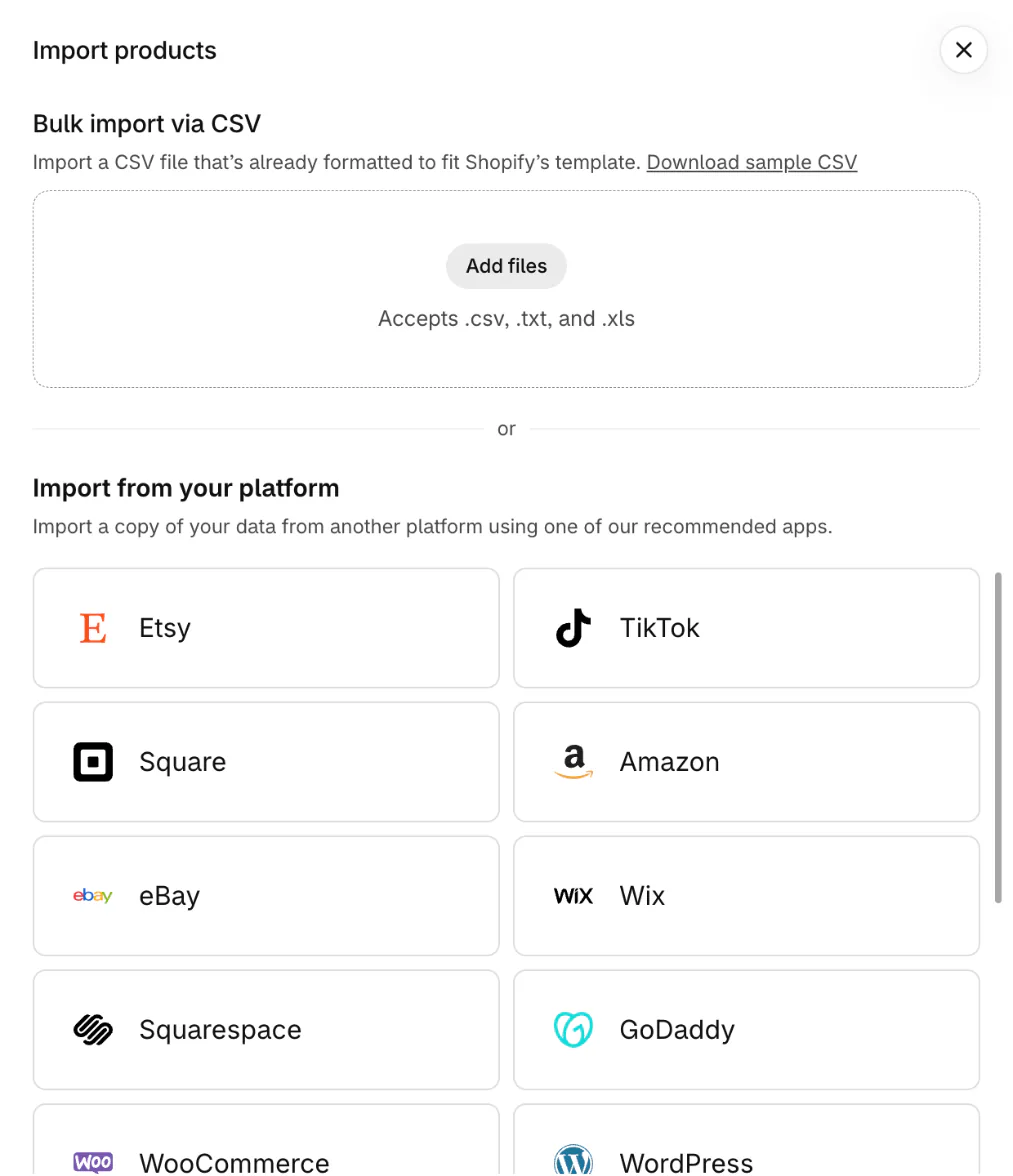
Shopify's post on the app says orders, reviews and menus need other tools, and that it adds no redirects. The app doesn't list Magento, and how to migrate from Magento to Shopify covers that move. It doesn't list BigCommerce either, and BigCommerce to Shopify covers that one.
What happens to a Wix product with four or more options?
With the app it arrives as one product with no options, because Wix allows 6 options and Shopify allows 3.
Say a shirt has five sizes, six colors, three fabrics and two fits. That is 180 variants on Wix, and Shopify's limit is 2,048 variants but only 3 options. Join fabric and fit into one option with six choices, and the shirt is 5 times 6 times 6, still 180 variants, on three options.
You have three ways out: join two options into one, sell the shirt as two products, or add an app that gives products more options. With the app, Shopify's guide says to recreate the variants after the import. With your own file, it has you delete the option columns past the third, which leaves a four-option product with rows that repeat the same three options. One way around that is to join two choices in the spreadsheet first, and to test one product.
How do you fix the Wix file for Shopify?
Eight fixes turn the Wix file into Shopify's, and two of them change a price.
Work in Google Sheets or Excel, and download Shopify's sample file from the "Download sample CSV" link in the Import window. Wix's headings run words together, so match each column by what it holds.
| Wix column | Shopify column | The fix |
|---|---|---|
| Row type, Product or Variant | One row per variant | Wix marks each row as a product row or a variant row. Join each product row with its first variant row, keep the other variant rows, and delete the row-type column. |
| Product address | URL handle, the last part of a product's web address | Letters, dashes and numbers only, with no spaces, accents or periods. Repeat it on every variant row so they import as one product. |
| Picture links | Product image URL | Wix separates several links with semicolons. Shopify takes one link per row, so each extra picture gets its own row with the same handle. |
| Collection | Collection | Wix separates collections with semicolons. A file puts a product in one, so keep one name and add the others after the import. |
| Option choices | Option1 value, Option2 value and Option3 value | One choice per row. Wix writes a color with its color code in front, so keep the name only. Join options first if a product has four or more, then delete the columns past the third. |
| Price and surcharge | Price | Wix prices a variant as the product price plus its surcharge. On each variant row enter the total, then delete the surcharge column. A $40 shirt with a $5 XL surcharge becomes $45. |
| Discount | Compare-at price, the higher price shown beside the sale price, and Price | Where a product has a Wix discount, put the original price in Compare-at price and the discounted price in Price, then delete the two discount columns. A $50 shirt at 20% off becomes Compare-at 50 and Price 40. |
| Stock and weight | Inventory quantity and Weight value (grams) | Wix can print InStock or OutOfStock instead of a number, so enter the count you hold. Weight goes in grams to the nearest whole number: kilograms times 1,000, pounds times 453.592, so 2 lb becomes 907. |
Columns are from Shopify's guide to migrating from Wix. The $40, $5, $50, 20% and 2 lb examples are ours.
Four more columns take new headings: name becomes Title, brand becomes Vendor, visible becomes Published on online store, and cost becomes Cost per item. That visible column shows or hides a product, and its TRUE and FALSE become true and false. Delete the columns Shopify's table doesn't list, such as ribbon, the custom text field and the two additional-info columns. Copy the additional info into Description first, and a ribbon's text into Tags to keep it as a tag.
How to import products to Shopify walks through the upload. A Shopify Partner can do the work for you, and how to hire a Shopify expert covers the cost.
What do you build again by hand after the import?
Collections, reviews, blog posts, digital products, pages and a theme all get set up by hand.
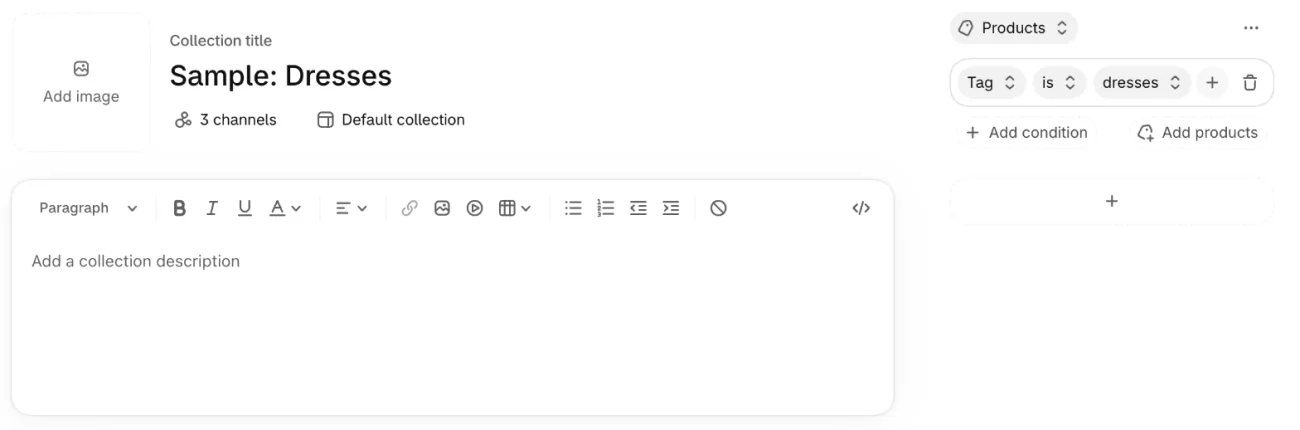
Collections. With the app, each Wix collection and ribbon came in as a tag. To turn a tag back into a collection, go to Products, then Collections, click "Add collection" and give it a title. Click "Add condition", choose "Tag", keep "is" in the next box and pick the tag from the last one, which offers only tags your products already carry. Shopify collections covers sorting and automating them.
Reviews. Wix says it can't export reviews from Wix Reviews. Shopify's guide says you can't migrate them, though a third-party review app can import them by hand. Sledge's Product Review tool collects new reviews and moderates them, but can't import old ones. How to get more reviews shows how to ask.
Blog posts. Copy each post into a Shopify blog, which starts with one named News. Check whether your migration app moves blog posts.
Digital products. Wix doesn't export them, so add each one in Shopify by hand. How to sell digital products covers where to sell them.
Pages and design. Paste short pages, like your shipping and refund policies, into new Shopify pages. Pick a free theme on the Themes page or buy one, and best Shopify themes helps you choose.
How do you keep your Wix links and domain working?
Each old Wix address needs a redirect before the domain moves, because Wix product pages default to product-page in the address and Shopify's to products.
Shopify warns that links to specific old pages likely won't load, so set up redirects in advance. A redirect sends visitors from an old address to its new page. Wix's blog posts default to post in the address, and SEO Settings can change both prefixes, so copy the addresses your store uses before you cancel. In Shopify, redirects sit under Content, then Menus, behind "View URL Redirects". Shopify URL redirects has the steps and the spreadsheet import.
Connect. Connecting keeps the domain registered at Wix. In Wix, open Account Settings, then Domains, then "Manage DNS records", the settings that say where your domain points, and make the changes Shopify's connection guide lists. Then click "Connect existing" under Settings, then Domains in Shopify. Shopify says this usually takes effect within two hours and can take up to two days.
Transfer. Wix says the domain must be unlocked, and a code arrives at your contact email after you choose "Transfer away from Wix". The transfer usually takes up to 7 days, your Wix site is disconnected, and business email stops until you set it up again. Wix and Shopify both make you wait 60 days after you register the domain or change its details, and a Shopify transfer includes a one-year renewal. Shopify says a domain already in use might go down during a transfer, so connect it to Shopify first and let the connection finish. Its Wix guide also says you might need to disconnect the domain in Wix's settings, or you might see certificate errors. Change your Shopify store name or domain has the Shopify side.
Can shoppers filter by your Wix tags and options?
Sledge doesn't import anything from Wix, but its filters can read the tags, vendors and options you carry over.
Sledge, a Shopify app for search, filters and reviews, has no importer for Wix and no history of your old site. With your products in Shopify, open Sledge's filters and click "Add filter item", and the form's "Source" list shows the product details a filter can read.
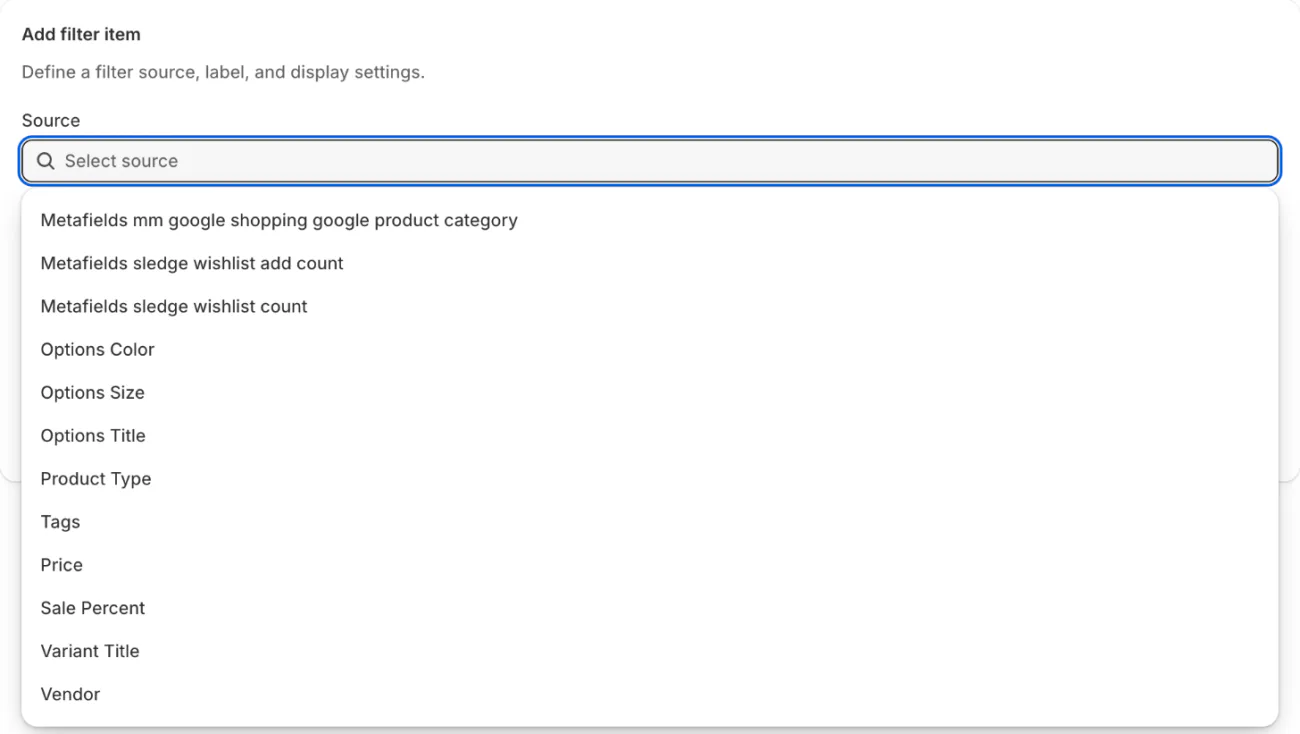
- Collections and ribbons that arrived as tags show under Tags, so a filter can offer Sale or New.
- Brand, which the file route fills into Vendor, shows under Vendor. After an app import, open one product to see whether Vendor is filled.
- Options such as Size and Color appear as Options Size and Options Color, and a product that lost its options has none for a filter to read.
- Sale Percent is worked out from Compare-at price and Price, so a Wix discount you moved into Compare-at price shows as a sale, and a product with none shows no sale.
Tags can arrive as one long list, and a Tags filter's "Advanced settings" can limit which tags it shows. How to migrate to Shopify sets up filters and search from scratch.
FAQ
Questions, answered
-

14-day free trial
Explore Sledge on your store before you decide to commit.
-

No credit card required
Start improving your store with no upfront commitment.
-

Setup in minutes
Get Sledge running without a lengthy setup process.
-

Built to grow sales
Turn shopper behavior into actions that help you sell more.
Can you move your whole Wix website to Shopify?
Not the site itself. Products and customers move by file, and orders need a migration app. Wix says it can't export blog posts or reviews, and Shopify's guide has you pick a theme rather than move your design, so you also copy pages across by hand.
Why did my Wix products arrive in Shopify without sizes or colors?
Shopify allows 3 options per product and Wix allows 6. Store Migration imports a product with 4 or more options as one product without its options or variants. Join two options into one, split the product in two, or add the variants again by hand after the import.
Do Wix reviews and blog posts move to Shopify?
No. Wix says it can't export reviews from Wix Reviews, or blog posts to other platforms. Shopify's guide says a third-party review app can import reviews by hand, and you copy blog posts into a Shopify blog yourself. Add a redirect from each old post address.
What happens to Wix collections and ribbons?
Shopify's guide says the Store Migration app imports both as product tags. A file import keeps one collection per product and has you delete the ribbon column. With the app, you build a collection from a tag with a Tag condition, and the tags stay available to filter by.
How do you transfer a domain from Wix to Shopify?
Connect it or transfer it. Connecting keeps the domain registered at Wix: you change settings there, then pick Settings, Domains, Connect existing in Shopify. To transfer, Wix says unlock the domain and ask Wix to transfer it away, which emails you a code. A transfer usually takes up to 7 days, and your Wix site is disconnected.
Can Wix digital products move to Shopify?
Not by file. Wix says it can't export digital products, and Shopify's guide says to add them to Shopify by hand. Our guide to selling digital products compares your own store, Etsy and Amazon. Move your physical products first and add the downloads after.
Moved your Wix products? Let shoppers filter them.
Sledge has no importer for Wix and no history of your old site. Once your products are in Shopify, its filters can show the tags, vendors and options you carried over, and you can collect new reviews with its Product Review tool. Try it free for 14 days. Growth Intelligence turns on when you pick a paid plan, reads your new store's orders, searches and carts, and its suggested fixes add up to one dollar figure, labeled Est. potential.